



Finding profitable products on Amazon isn’t luck – it’s data. Successful wholesale and arbitrage sellers rely on Amazon product analytics tools to uncover winning deals, analyze brands, and eliminate risky products before they buy.
These tools reveal what sells, who sells it, and whether you can sell it too. From scanning supplier price lists to researching single ASINs and evaluating entire brands, product analytics software powers every smart sourcing decision.
In this post, we’ll explore the six best Amazon product analytics tools and show why Seller Assistant stands out as the only all-in-one platform that automates the entire reseller workflow.
Note. Seller Assistant is an end-to-end Amazon workflow management platform that integrates 10+ wholesale-focused solutions into one connected system. It combines sourcing workflow automation, bulk research and intelligence tools, and integrated Chrome extensions – giving you everything you need to streamline finding deals, managing suppliers, and creating purchase orders.

The platform aggregates: workflow management tools – Purchase Orders Module, Suppliers Database, Warehouses Database to organize, automate, and scale every step of your wholesale and arbitrage operations ; bulk research & sourcing tools – Price List Analyzer, Bulk Restriction Checker, Sourcing AI, Brand Analyzer, Seller Spy to evaluate supplier price lists, verify selling eligibility and restrictions, open new brands, and discover winning product ideas from competitors to expand your product catalog ; Chrome extensions – Seller Assistant Browser Extension, IP-Alert Extension, and built-in VPN by Seller Assistant to deep-research products, check IP claims and compliance, and access geoblocked supplier sites directly within your browser; and integrations & team access features – seamless API connectivity and integrations with Zapier, Airtable, and Make, plus Virtual Assistant Accounts for secure, scalable team collaboration.
With Seller Assistant, every step of your Amazon wholesale and arbitrage workflow is automated and connected.
Types of Amazon Product Analytics Tools Every Reseller Needs
Amazon reselling is a data-driven business. Whether you sell wholesale, run online arbitrage, or dropship, your profitability depends on how well you analyze products, brands, and suppliers. There are dozens of tools promising insights – but not all are equally useful. The most essential Amazon product analytics tools fall into four core categories: all-in-one workflow tools, bulk price list scanners, single product research tools, and brand analytics tools. Each serves a unique role in helping you find, verify, and scale profitable inventory.
All-in-one wholesale workflow automation tools
All-in-one workflow tools bring every step of Amazon sourcing and analytics into one connected system. Instead of switching between separate extensions, spreadsheets, and scanners, they automate everything – from analyzing supplier price lists and checking restrictions to managing suppliers and creating purchase orders. Tools like Seller Assistant combine bulk product analysis, single ASIN research, and brand-level insights in one platform.
Seller Assistant doesn’t stop at analytics – it adds full workflow automation. Alongside its Price List Analyzer, Brand Analyzer, and Seller Assistant Browser Extension, it offers integrated Purchase Orders Module, Suppliers Database, Warehouses Database, connecting product analytics directly to sourcing and operations. It also includes tools like Bulk Restriction Checker, IP-Alert Extension, Seller Spy, and Sourcing AI, which detect gated products, IP risks, competitor trends, and supplier opportunities automatically. This saves sellers from overpaying for multiple tools and makes scaling wholesale workflows fast, accurate, and effortless.
Bulk price list scanners
Bulk price list scanners analyze thousands of supplier SKUs in minutes, matching them to Amazon listings and showing profitability, product performance, risks, and a lot of other product data. They’re essential for wholesale and online arbitrage sellers who work with large spreadsheets of supplier offers. Instead of manually checking each ASIN, these scanners automatically flag high-margin, low-risk products worth sourcing. Tools like Seller Assistant’s Price List Analyzer or Scan Unlimited transform raw supplier files into actionable deal shortlists – helping sellers make fast, data-backed sourcing decisions.
Product research tools
Product research tools focus on analyzing one product at a time. They display real-time Amazon data such as sales rank, competition, profitability, and restrictions directly on product pages. For online arbitrage and dropshipping sellers, they are indispensable for verifying whether a deal is worth buying. Tools like Seller Assistant Extension or SellerAmp let you check BSR, Buy Box price, and IP alerts on the spot, helping you quickly identify profitable opportunities and avoid risky listings.
Brand analytics tools
Brand analytics tools help sellers evaluate whether a brand is profitable and resale-friendly before approaching it as a supplier. They show key brand-level metrics such as estimated monthly revenue, Amazon in-stock rate, number of sellers, and average Buy Box price. Tools like Seller Assistant Brand Analyzer or SmartScout’s Brands allow sellers to compare brand performance, competition, and overall market potential. This helps wholesalers and arbitrage sellers focus only on brands with high sales volume, low competition, and strong profit margins – the foundation for scalable, low-risk sourcing.
Bulk Price List Scanners
Bulk scanners turn messy supplier spreadsheets into deal-ready shortlists at scale – essential for wholesale and high-volume OA. The difference-maker is what happens after the scan: verifying eligibility, filtering out risky ASINs, and pushing winners straight into purchasing. Seller Assistant stands out because its Price List Analyzer plugs into a full workflow (Supplier/Warehouse databases, Purchase Orders), and layers on product analytics other scanners lack – Bulk Restriction Checker, IP Alert, Seller Spy, Sourcing AI, saved views, and team notes. You can also Like/Dislike items, build a shortlist in-table, export selected, base profit on 30/90/180-day average Buy Box, and edit COG, shipping, PQ, prep with instant recalcs.
Price List Analyzer vs. Scan Unlimited – comparison
Capability | Seller Assistant’s Price List Analyzer | Scan Unlimited |
Primary purpose | Bulk scan + integrated workflow from shortlist to Purchase Orders | Bulk spreadsheet scan and filtering |
ASIN matching & enrichment | Auto-match + 70+ metrics (eligibility, risks, sales, fees, Buy Box history, Amazon in-stock, competition) | Match + core metrics (price/rank history, fees, offers count) |
Profit basis | Current or average Buy Box (30/90/180 days) for realistic, seasonality-aware profit | Current Buy Box focus (limited historical profit modes) |
Inline editing & recalcs | Edit COG, shipping, package qty, prep in table; instant recalculation; bulk cost presets | Basic calculator; no full inline table recalcs across rows |
Restrictions & eligibility | Built-in: check single or bulk eligibility/gates inside workflow | No native bulk eligibility checks |
IP & risk intelligence | IP Alert, hazmat/fragile/meltable/adult/oversize flags; warnings (No FBA fees, No BB, etc.) | Basic warnings inside results; no detailed IP history |
Shortlisting & export | Likes/Dislikes, filter by Likes, create shortlist in-table, export selected | Save/filter rows; no Like/Dislike workflow |
Filters & saved views | Advanced filters on any metric; saved team views (e.g., “Potential Leads”) | Strong filters; no shared saved views concept |
Variations & competition | Variation count + signals; seller count, Buy Box rotation, Amazon in-stock rate | Variation list; offers and prices (stock not shown |
OA research tie-in | Extension (Quick View, Side Panel) to validate items on Amazon/supplier sites | No native browser research tools |
Brand & competitor intel | No native brand/storefront modules | |
Supplier & warehouse routing | Supplier/Warehouse databases auto-fill POs and routing | Not provided |
Purchase order creation | One-click PO creation from shortlist; PDF/XLSX export | Not provided |
Team & VA ops | VA accounts, shared notes, built-in VPN | No VA tools or VPN |
Integrations & automations | API, Zapier/Make, Sheets; Sourcing AI to find US suppliers | Keepa integration; limited external automations |
“Daily picks” style leads | – | Daily Picks (premium) curated leads |
Seller Assistant’s Price List Analyzer
What it is
Price List Analyzer by Seller Assistant is a bulk Amazon product analysis tool built for wholesale, OA, and dropship workflows. It converts supplier spreadsheets into decision-ready tables by auto-matching rows to Amazon ASINs, calculating profitability, and enriching each line with 70+ sourcing metrics (eligibility, risks, sales performance, competition, Buy Box behavior, fees, and more).
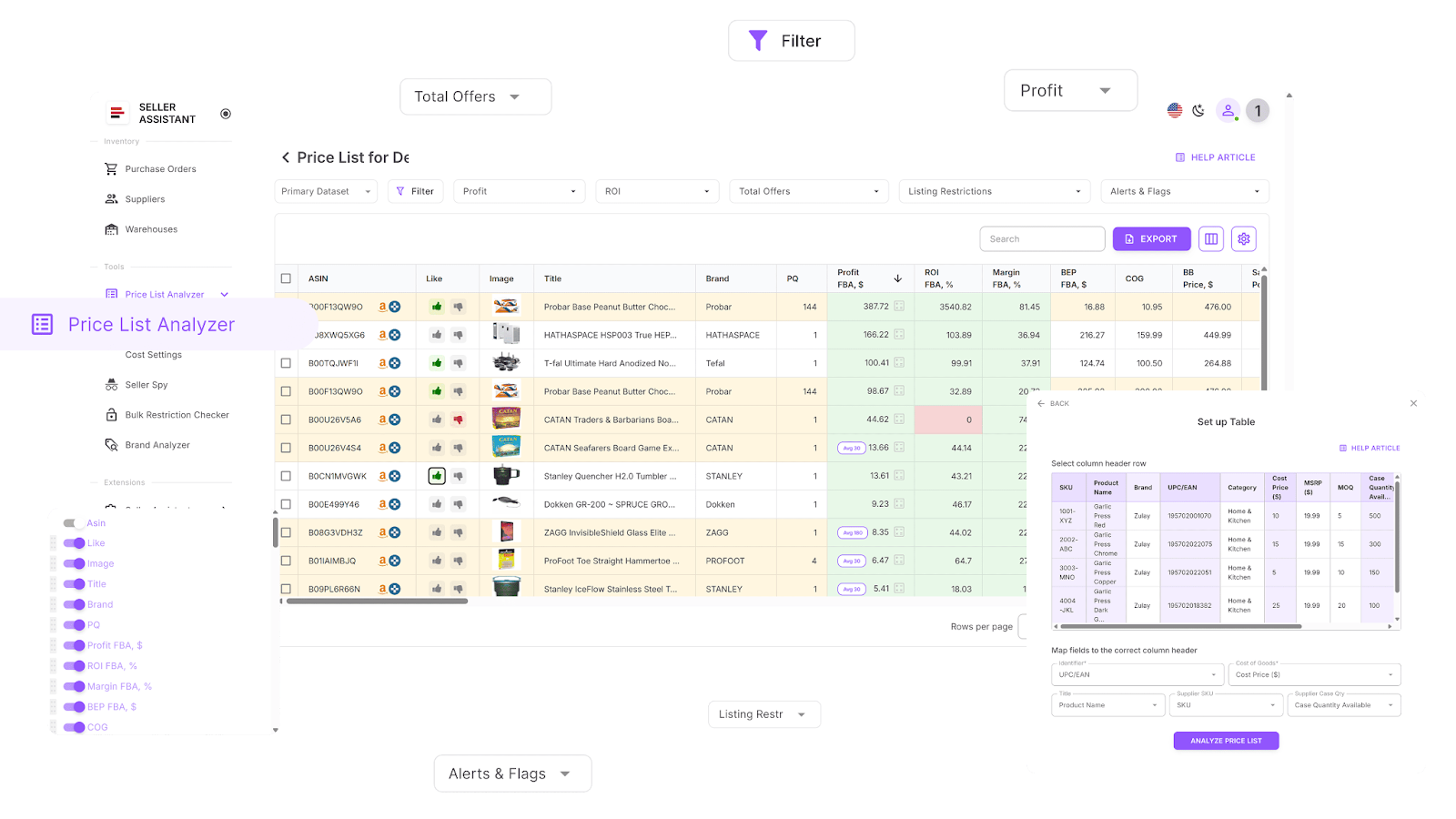
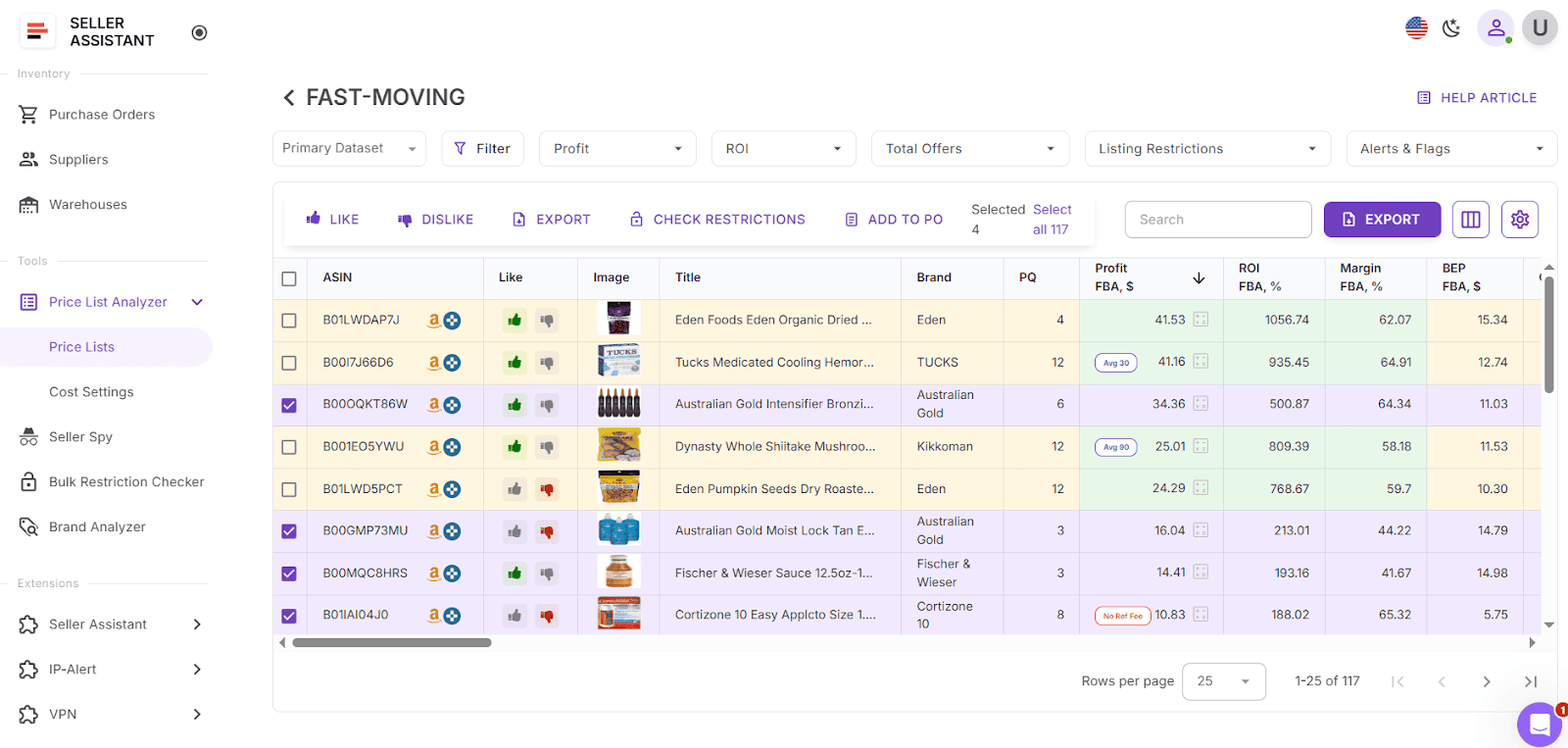
You can filter on any metric, shortlist winning items for purchase, switch profit basis to 30/90/180-day average Buy Box for realistic modeling, edit costs inline with instant recalculation, and leave team notes that reappear the next time the ASIN shows up.
This Software Makes Amazon FBA Wholesale Selling 10x Easier
What it does
-
Bulk analysis & ASIN matching
-
Process large supplier files to uncover high-ROI, low-risk opportunities.
-
Auto-map UPC/EAN/GTIN or titles to Amazon ASINs at scale.
-
Identify products you can’t sell on your account with built-in restriction checks.
-
70+ metrics added to your table
-
Sales signals: BSR, BSR trends, BSR drops, sales velocity, monthly unit and revenue estimates, ratings/reviews.
-
Profitability: profit, ROI, margin, break-even (FBA/FBM ).
-
Price history & stability: average Buy Box (30/90/180 days), price dynamics %, min FBA/FBM, current vs historical BB.
-
Fees & costs: referral, FBA/FBM fulfillment, storage, inbound shipping, prep (hazmat/fragile ), misc fixed/%, DST/VAT, sales tax.
-
Competition: total offers, seller count, Buy Box rotation, Amazon in-stock rate.
-
Risk & data quality controls
-
Auto-flags: oversize, HazMat, meltable, fragile, IP complaints, variations, sets/bundles.
-
Warnings (need review): “No FBA fees,” “No Buy Box,” “No COGs,” “ASIN not found,” “Set/Bundle,” “Approval required,” “Too low/high FBA ROI,” etc.
-
Filtering, views, and collaboration
-
Filter by any metric (profitability, sales, risks, fees, dimensions, brand/category) and save reusable team views.
-
Like/Dislike products, build a purchase shortlist inside the table, and export selected rows.
-
Choose profit basis: current BB or 30/90/180-day average BB to avoid spike-driven false positives (great for seasonal items ).
-
Inline editing (COG, shipping, package qty, prep) with real-time recalculation; bulk cost presets for fast updates.
-
Team notes travel with the ASIN and resurface across future uploads.
How it works (step-by-step)
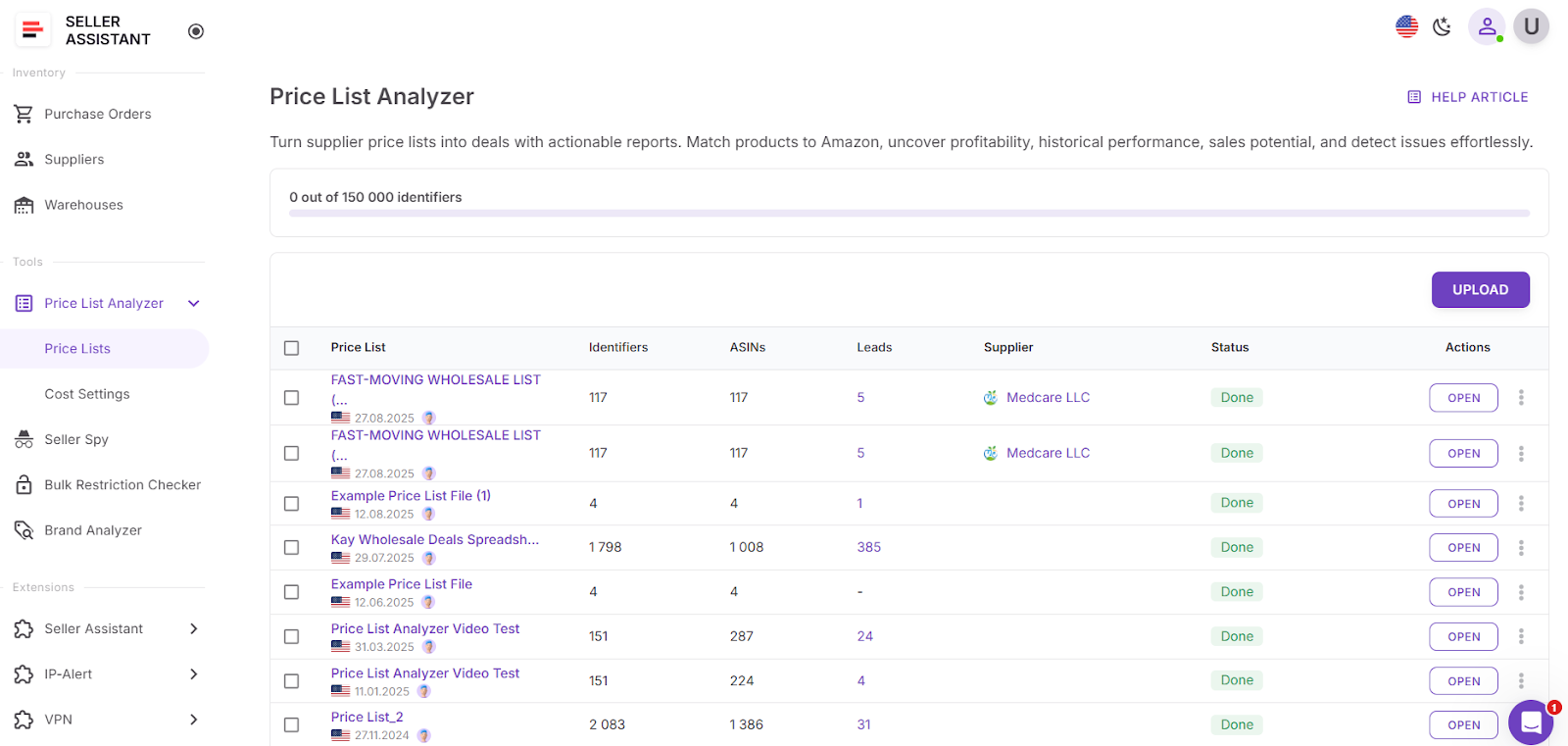
- Step 1. Launch Price List Analyzer
Open Price List Analyzer in your Seller Assistant account.
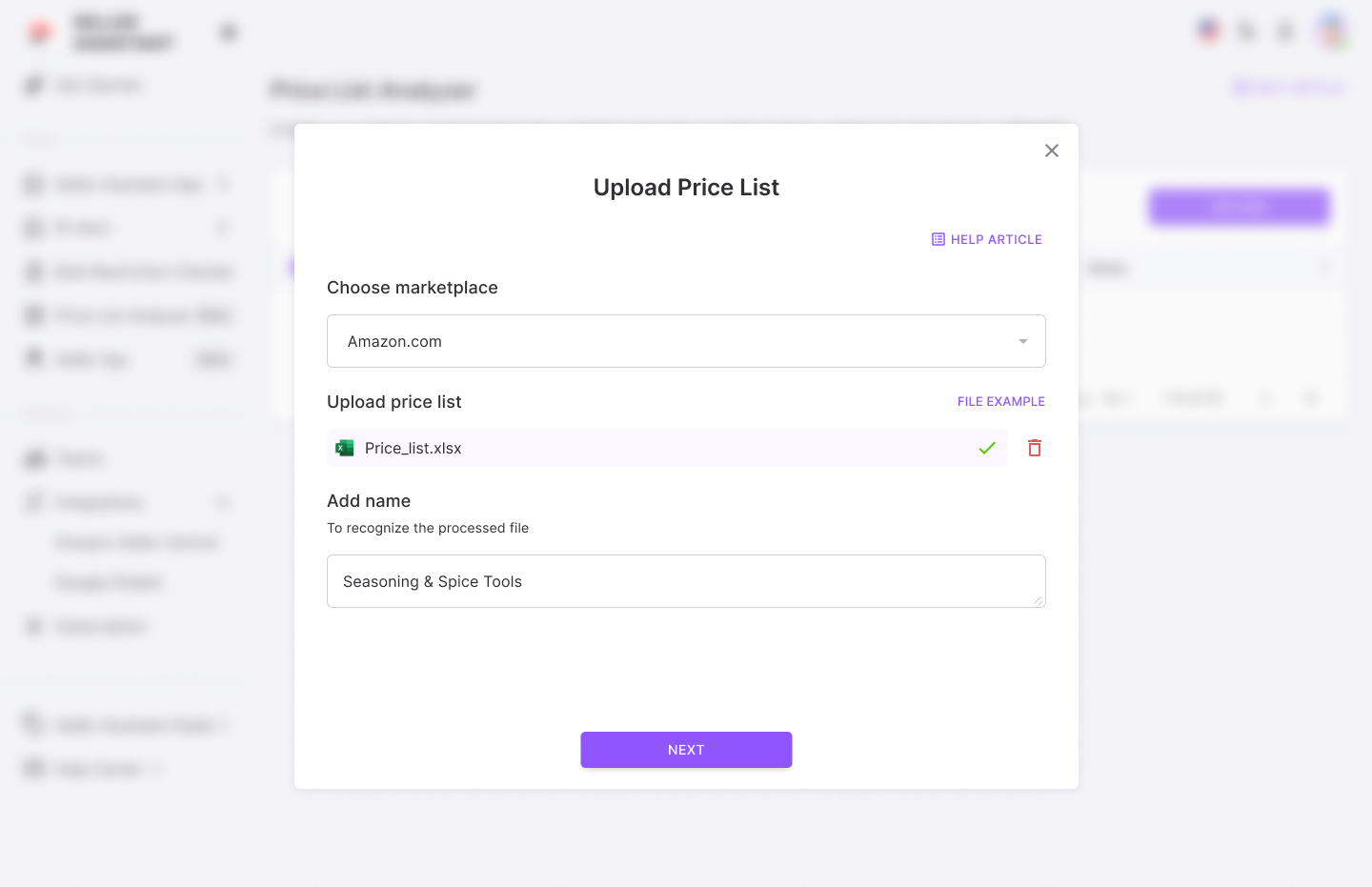
- Step 2. Upload your file
Pick marketplace, drag in .xlsx/.csv, name the run. Upload your wholesale price list.
- Step 3. Map columns & scope
Select sheet (if multiple), choose the starting data row, map Identifier (UPC/EAN/GTIN), Cost of Goods, and (optionally) Title.
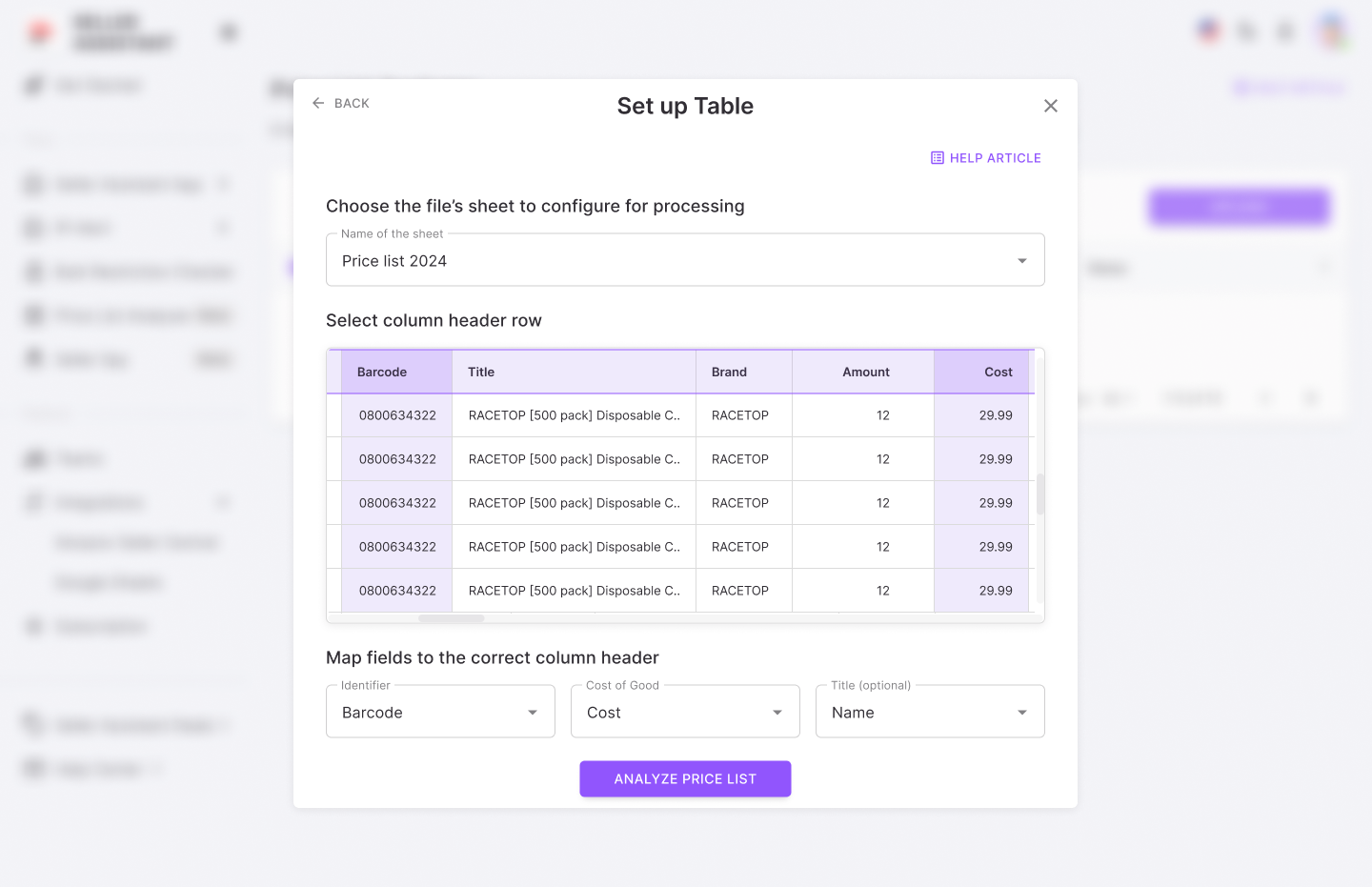
- Step 4. Analyze
Click Analyze price list to fetch matches and enrich with metrics.
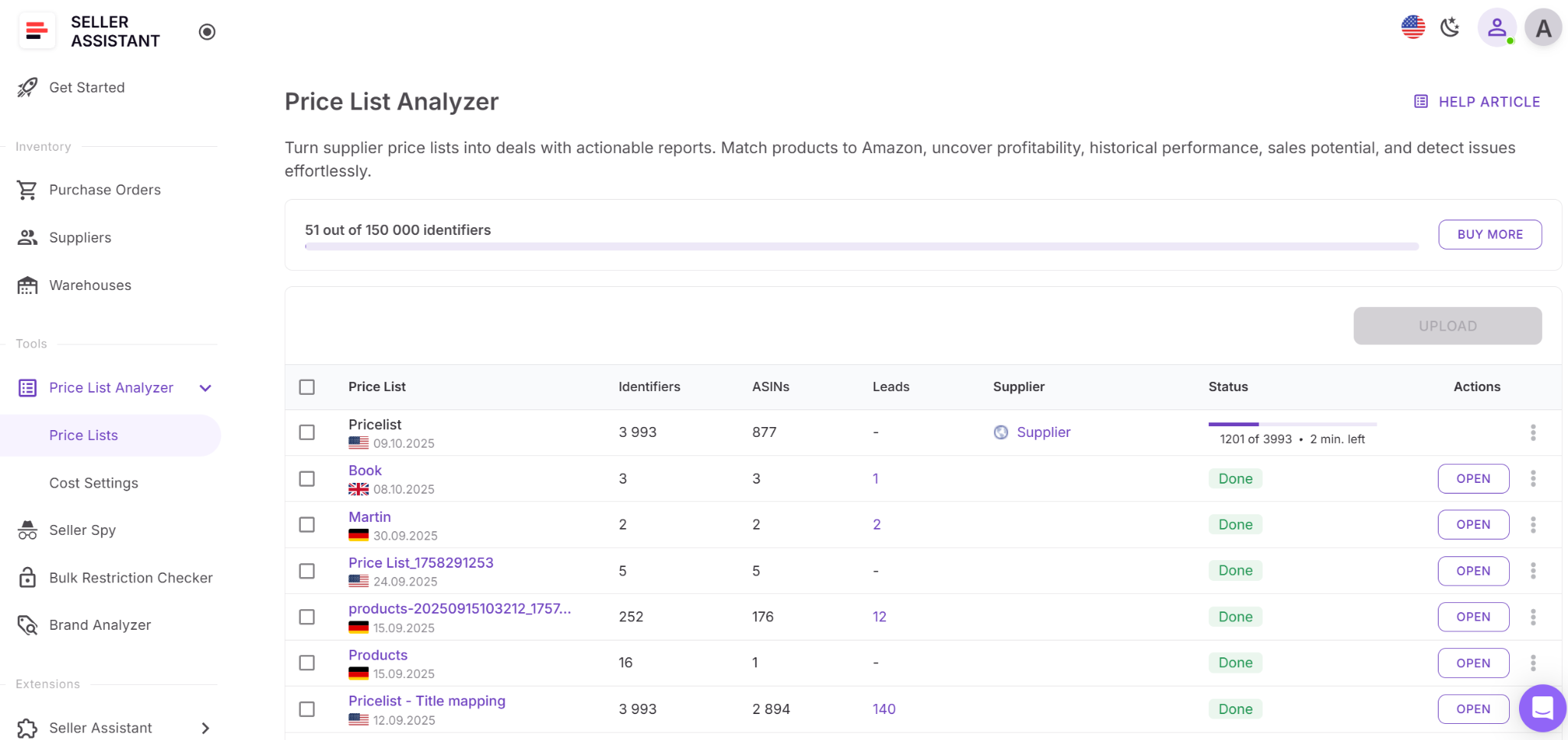
- Step 5. Review results
Work in the UI table or download XLSX.
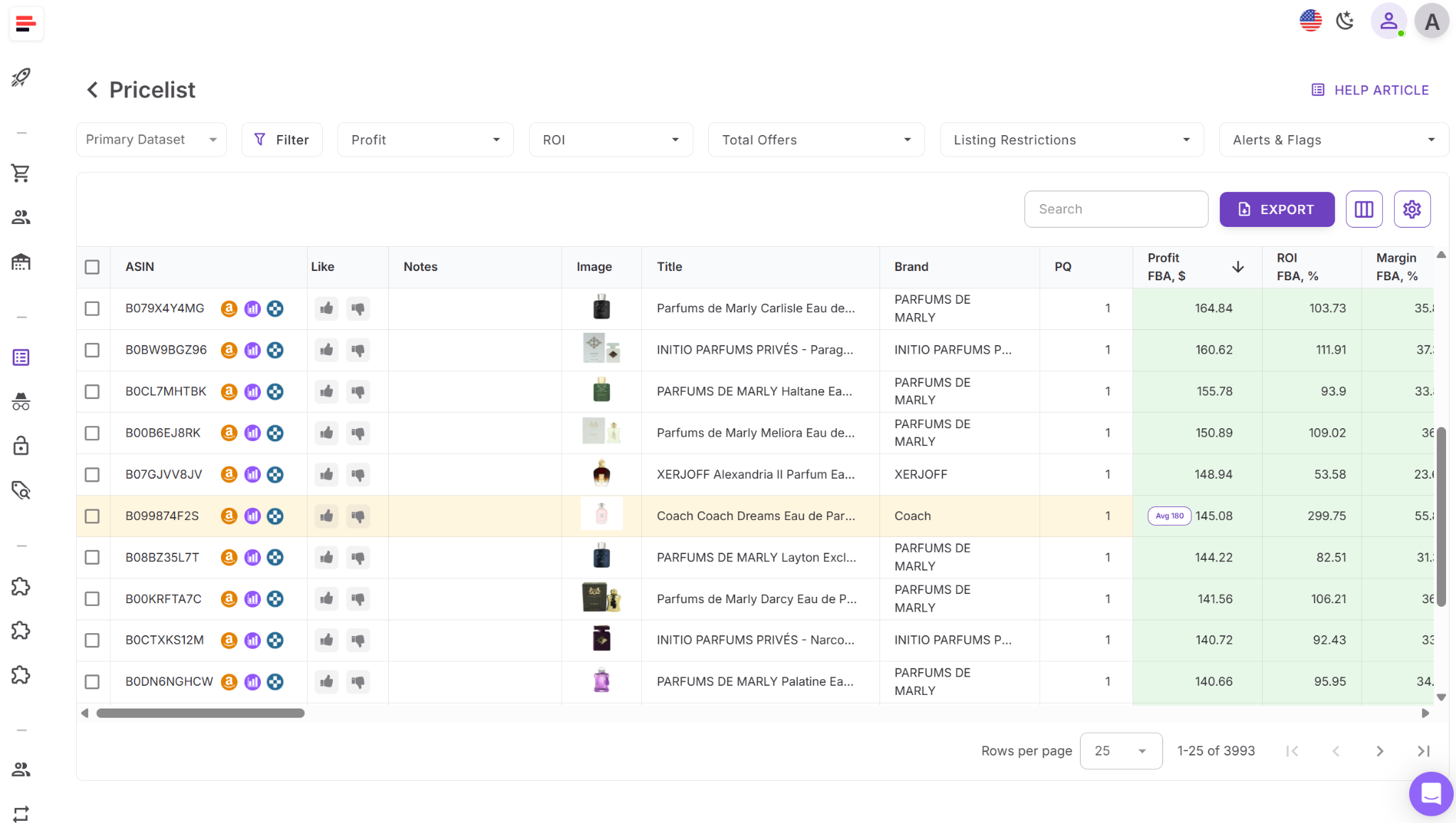
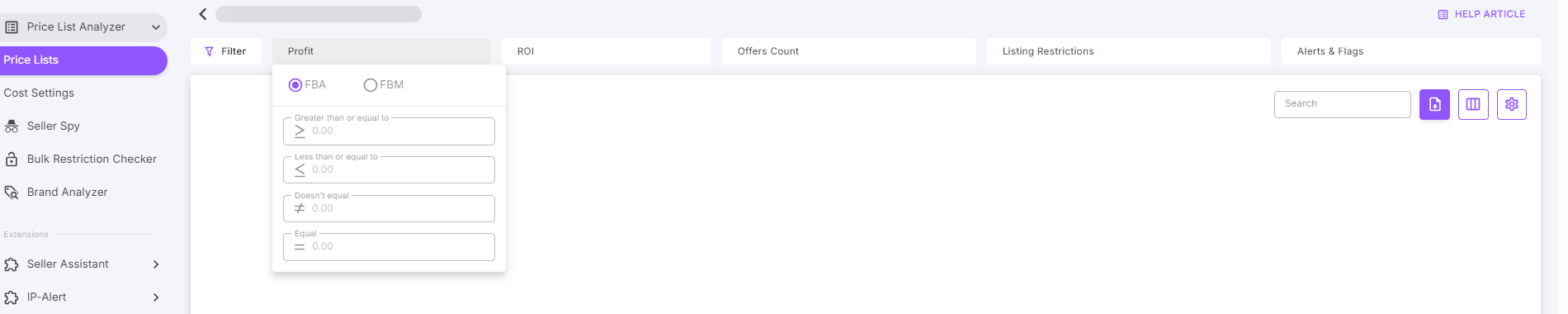
- Step 6. Filter & prioritize
Use Quick Filters (Profit/ROI/Offers/Alerts/Restrictions) or the advanced modal to narrow to high-ROI, low-risk deals; toggle FBA/FBM where needed.
- Step 7. Edit costs & recalc
Adjust COG, shipping, prep, or package quantity inline; PLA recalculates profit/ROI instantly.
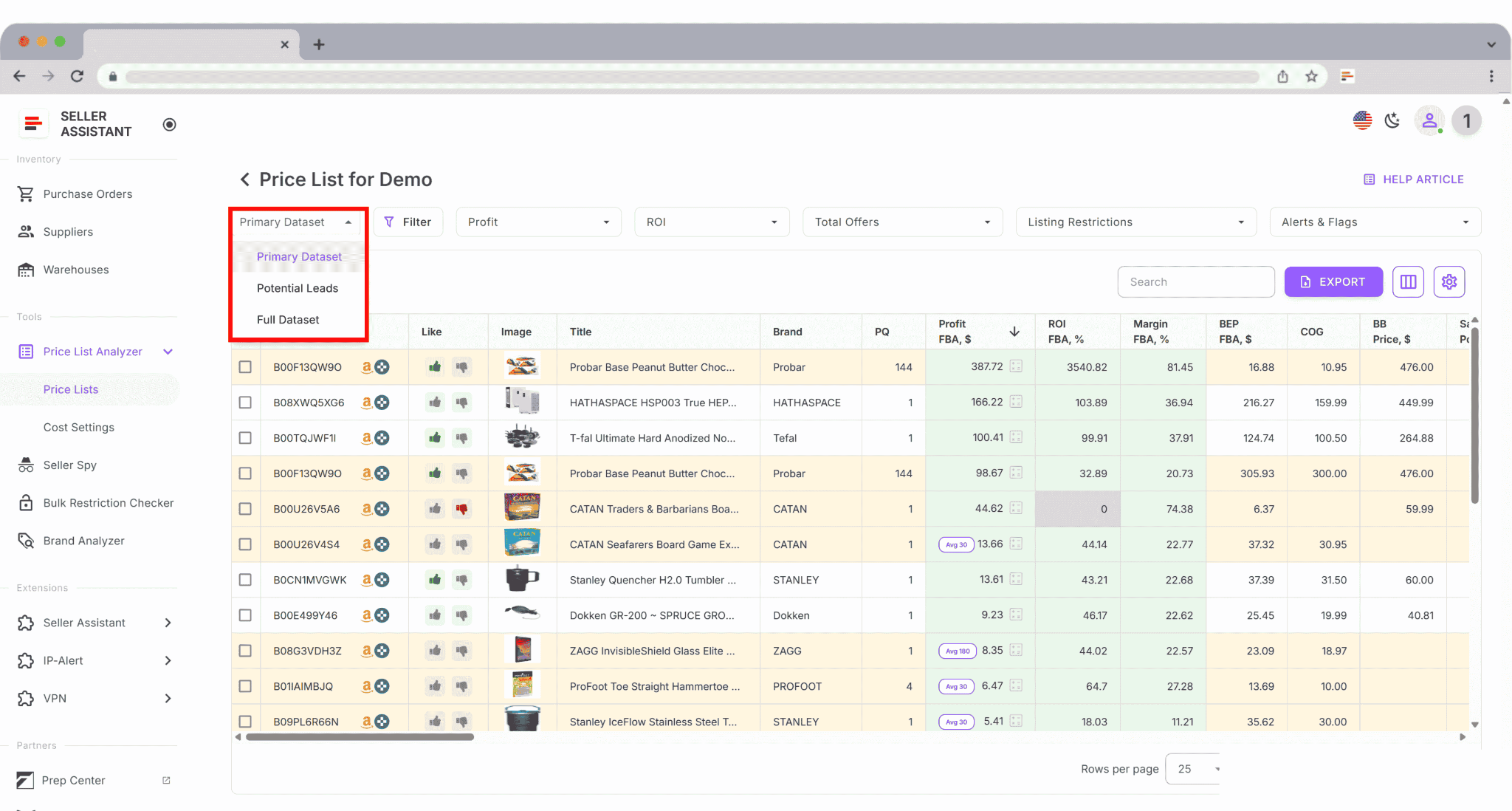
- Step 8. Save views & shortlist
Save your column/filter layout as a team view (e.g., “Potential Leads”), Like promising items, filter by Likes, and export selected.
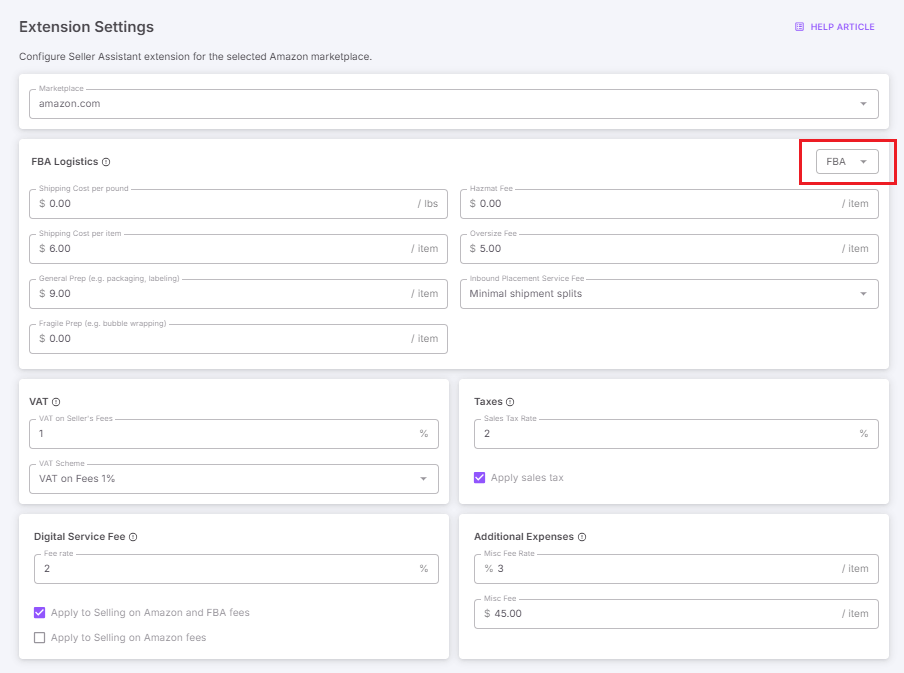
- Step 9. Set cost rules (optional)
In Settings, choose fulfillment method and add logistics, tax, VAT, DSF, hazmat, or misc fees; apply globally to keep analysis accurate.That’s it – upload, map, analyze, verify restrictions, filter, fine-tune costs, and export a clean shortlist ready for purchase orders.
Scan Unlimited
What it is
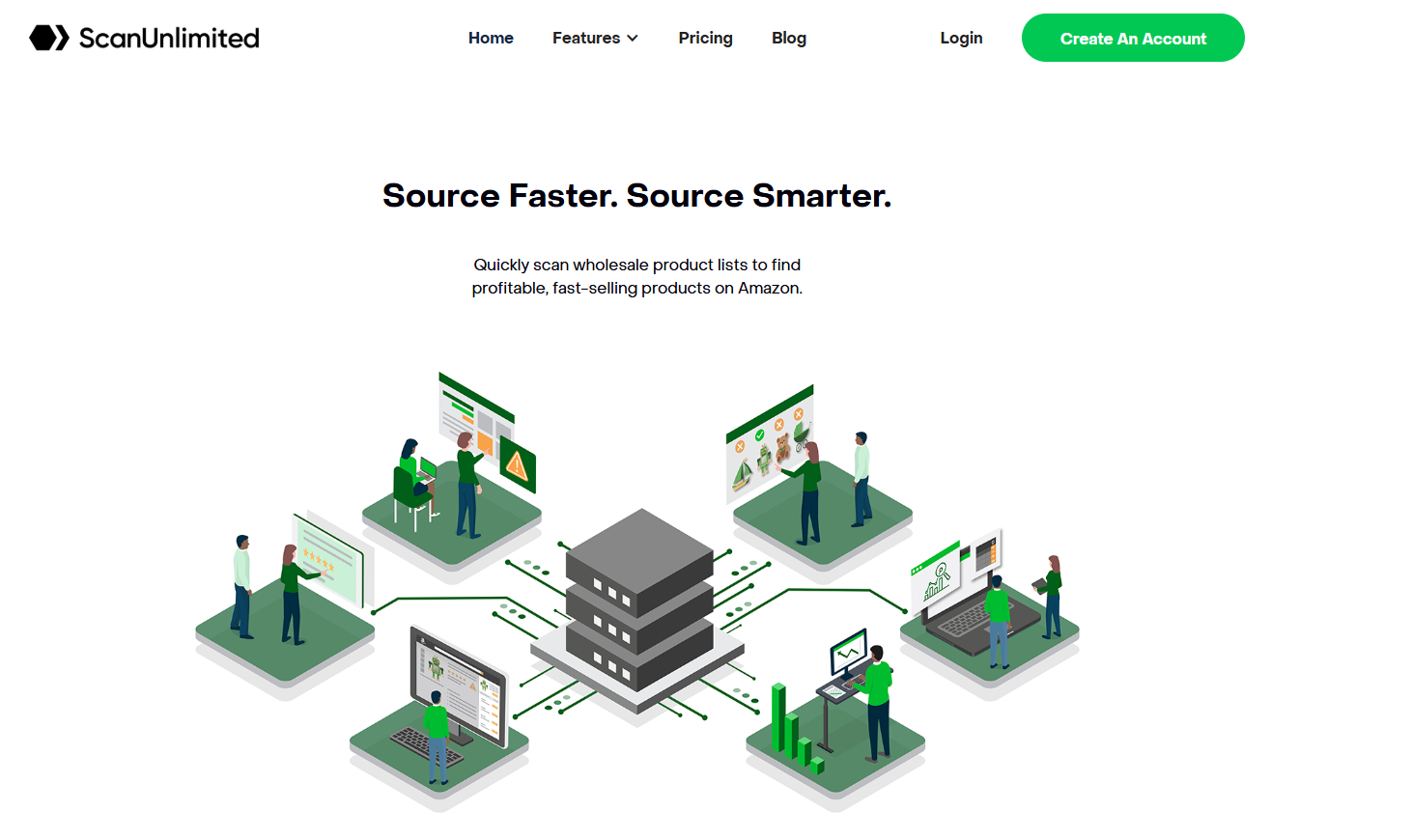
Scan Unlimited is a bulk product scanning tool for Amazon sellers that analyzes supplier price lists to find potentially profitable products. It’s primarily designed for wholesale and online arbitrage sellers who work with large CSV or Excel lists containing UPCs, ASINs, or product names. The tool matches each supplier product to Amazon listings and calculates basic profit metrics using live market data. Its goal is to help sellers quickly identify high-ROI opportunities and discard unprofitable or mismatched items without manually checking each ASIN.
While powerful for data parsing, Scan Unlimited functions as a standalone scanner rather than a connected workflow solution – meaning sellers must export results and use other tools for restrictions, IP checks, sourcing validation, or purchase orders.
What it does
- Bulk file upload and ASIN matching – Upload supplier lists (CSV/XLSX) with UPC, EAN, or ASIN data. Scan Unlimited automatically matches items to Amazon listings and populates key performance indicators.
- Profitability calculations – Calculates profit, ROI, and margins based on current Buy Box prices, COG, and fees (referral, FBA, and shipping). Supports both FBA and FBM modes.
- Sales and ranking data – Provides sales rank (BSR), category, number of sellers, and price history for each product to evaluate competitiveness and demand.
- Custom filters and sorting – Filter by ROI, profit, sales rank, or price; sort products by profitability or estimated margin to find the best deals quickly.
- Data export and collaboration – Export analyzed lists to Excel or Google Sheets for further processing or sharing with VAs and sourcing teams.
- Daily Picks (premium) – Offers curated lists of potential leads based on preset profitability criteria, aimed at simplifying daily product discovery.
- Keepa integration – Connects to Keepa to display price history charts and average Buy Box data, helping sellers spot trends or temporary price drops.
Limitations compared to workflow platforms
Scan Unlimited focuses on data scanning, not full business automation. It doesn’t integrate with supplier or warehouse databases, can’t generate purchase orders, and lacks built-in tools for bulk restriction checks, IP alerts, or brand-level analysis. Because of this, sellers typically pair it with other extensions or spreadsheets to complete the sourcing and validation process.
In short, Scan Unlimited is a fast, reliable scanner for supplier spreadsheets, but it stops at product identification. It’s ideal for sellers who only need to scan price lists – whereas tools like Seller Assistant’s Price List Analyzer extend the process into eligibility verification, sourcing, purchase ordering, and full workflow automation.
Product Research Tools
When analyzing individual ASINs, sellers rely on single product research tools to understand whether a product is profitable, allowed for resale, and free from policy or IP risks. These tools show the real story behind each listing – from sales potential and Buy Box stability to competition and hidden restrictions. Competitor storefront analysis, and quick export into your sourcing and purchasing workflow.
Seller Assistant goes far beyond traditional product research software like SellerAmp, offering not just product data but a complete sourcing ecosystem – integrated restriction checks, IP alerts, supplier lookups, competitor storefront analysis, and quick export into your sourcing and purchasing workflow.
While SellerAmp focuses on analyzing a single product’s profitability, Seller Assistant Extension connects that insight directly to your entire workflow, eliminating the need for multiple apps or spreadsheets.
Seller Assistant Extension vs SellerAmp – comparison
Capability | Seller Assistant Extension | SellerAmp |
Primary purpose | Multi-site research and integrated Amazon product analytics across product, search, supplier, and storefront pages | Single-product analysis for OA and RA |
Product data view | On-page Amazon widget + Side Panel on supplier sites + Quick View on search results+Storefront Widget | On-page Amazon product data panel |
Profitability calculation | Advanced FBA/FBM Profit Calculator with editable logistics, prep, VAT, tax, and fee breakdowns | ROI, margin, and profit calculations |
Eligibility and restriction check | Built-in Restriction Checker tied to your Seller Central account | Restriction and hazmat flags |
IP risk detection | Integrated IP Alert system showing complaint type and date | IP alerts via Keepa or external sources |
Risk alerts | Hazmat, meltable, fragile, adult, oversize, generic, Amazon competition alerts | Hazmat, meltable, or oversized alerts |
Sales and velocity data | Sales Estimator + BSR, Buy Box rotation, and category performance | BSR and estimated sales data |
Competitor and brand research | Storefront Widget shows top-selling brands, categories, and profitable items in competitor stores | No storefront or brand analytics |
Product variations | Variation Viewer with rating and sales share per variation | Variation data summary |
Stock tracking | Stock Checker shows FBA/FBM quantities | Stock count per seller |
Supplier lookup | Sourcing AI to find up to 10 verified US suppliers or distributors per product | Manual or third-party sourcing links |
External platform lookups | One-click Lookup Links to eBay, Walmart, Google, Target | Manual copy or browser search |
Historical data & charts | Keepa-powered charts integrated into the panel | Keepa integration (separate or embedded) |
Notes and shortlisting | Notes, Likes/Dislikes synced across your account and Price List Analyzer | Product save or list creation |
Export & reporting | One-click export to Google Sheets | Export to spreadsheet |
Integration with workflow | Part of Seller Assistant ecosystem – connected with Price List Analyzer, Brand Analyzer, and Seller Spy | Standalone tool |
Browser coverage | Chrome, Edge, Firefox + built-in VPN | Chrome and mobile app |
Team collaboration | Shared notes, VA accounts, and team access | Limited sharing (via lists) |
Seller Assistant Extension
What it is
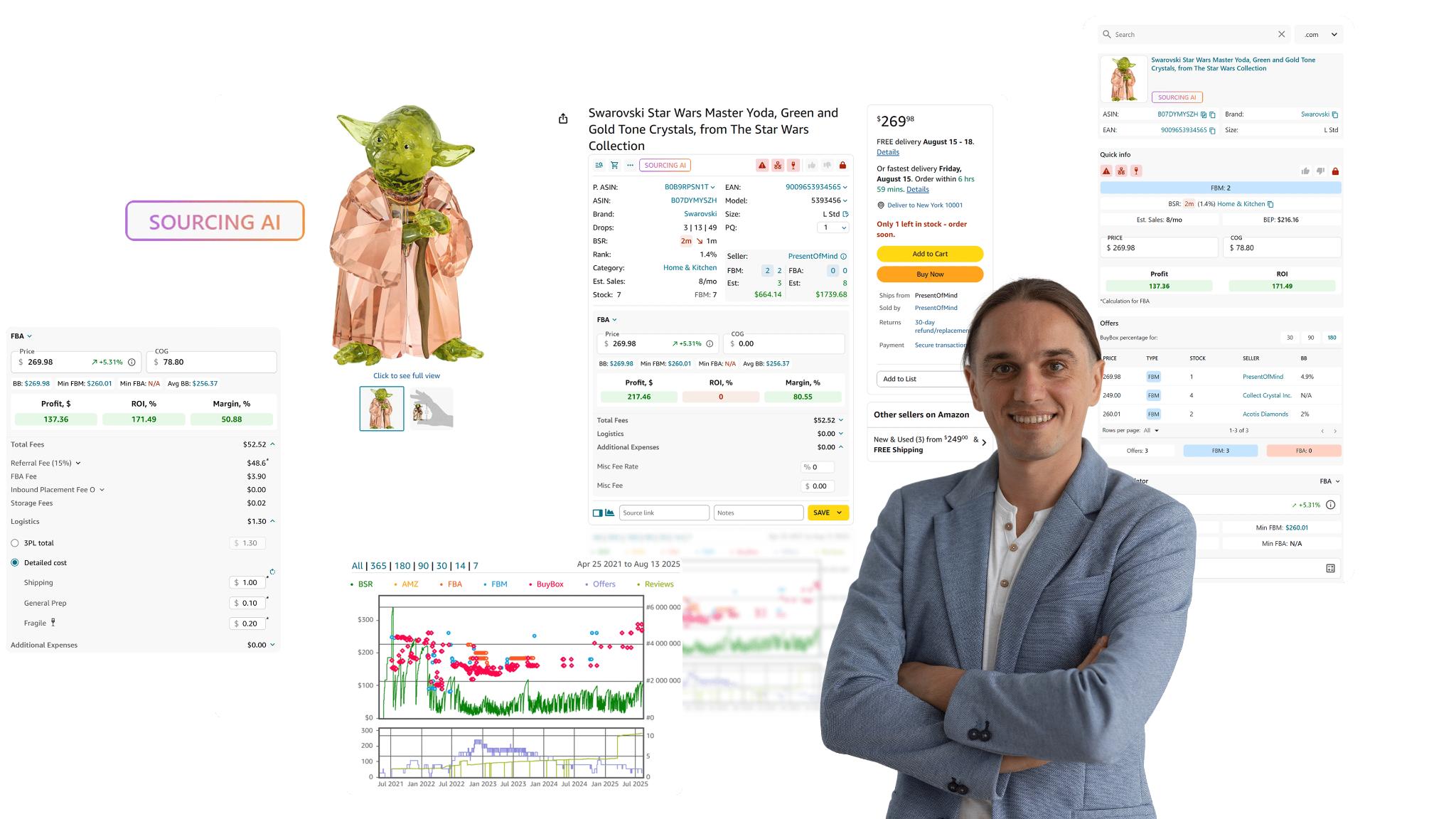
Seller Assistant Extension is a browser add-on that turns Amazon pages, supplier sites, and competitor storefronts into a live research workspace. It overlays a clean dashboard with profitability, demand, risk, and competition data, so you can judge an ASIN’s resale potential without switching tabs. It’s built for wholesale, OA, and dropship sellers who want fast, on-page analysis connected to their broader sourcing workflow.
What it does .
- Full product intelligence on-page
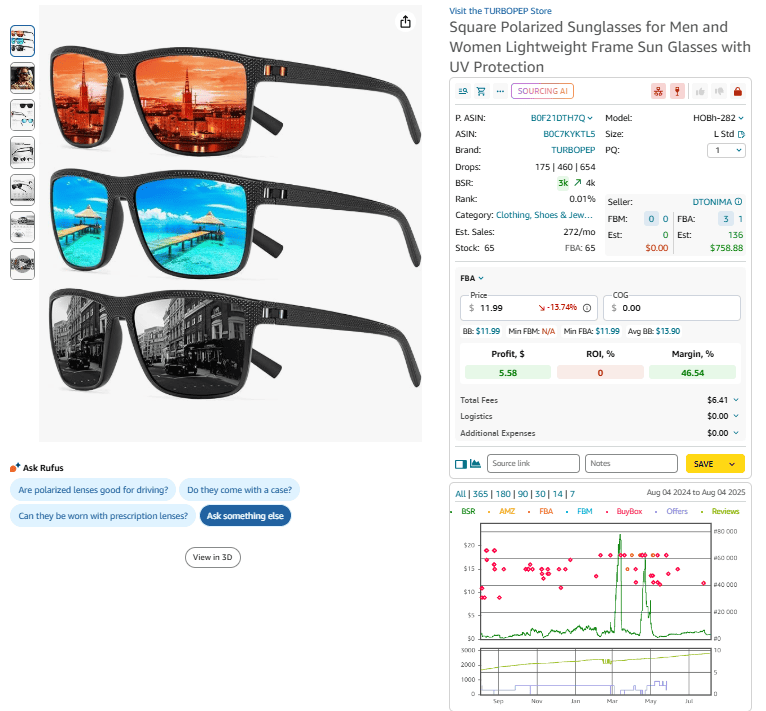
Shows sales potential and speed (BSR, velocity), competition intensity, your Buy Box odds, sellability (account-level restrictions), IP complaint history, profitability, and top variations with sales/rating signals, plus historical performance.
- Supplier site research (Side Panel View )
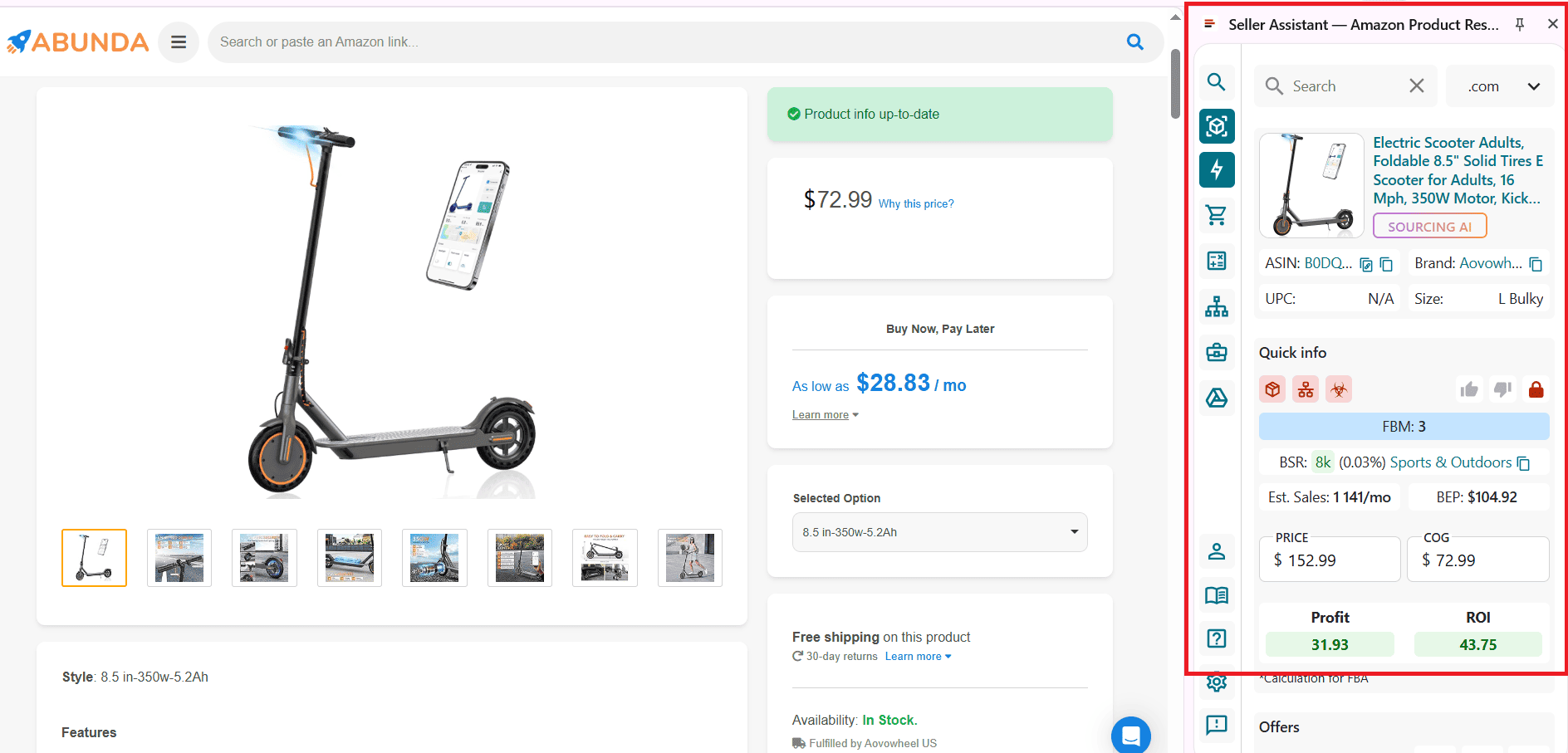
Opens a split-screen panel on supplier websites with the matching Amazon data beside it for instant compare-and-verify.
- Quick screening on search
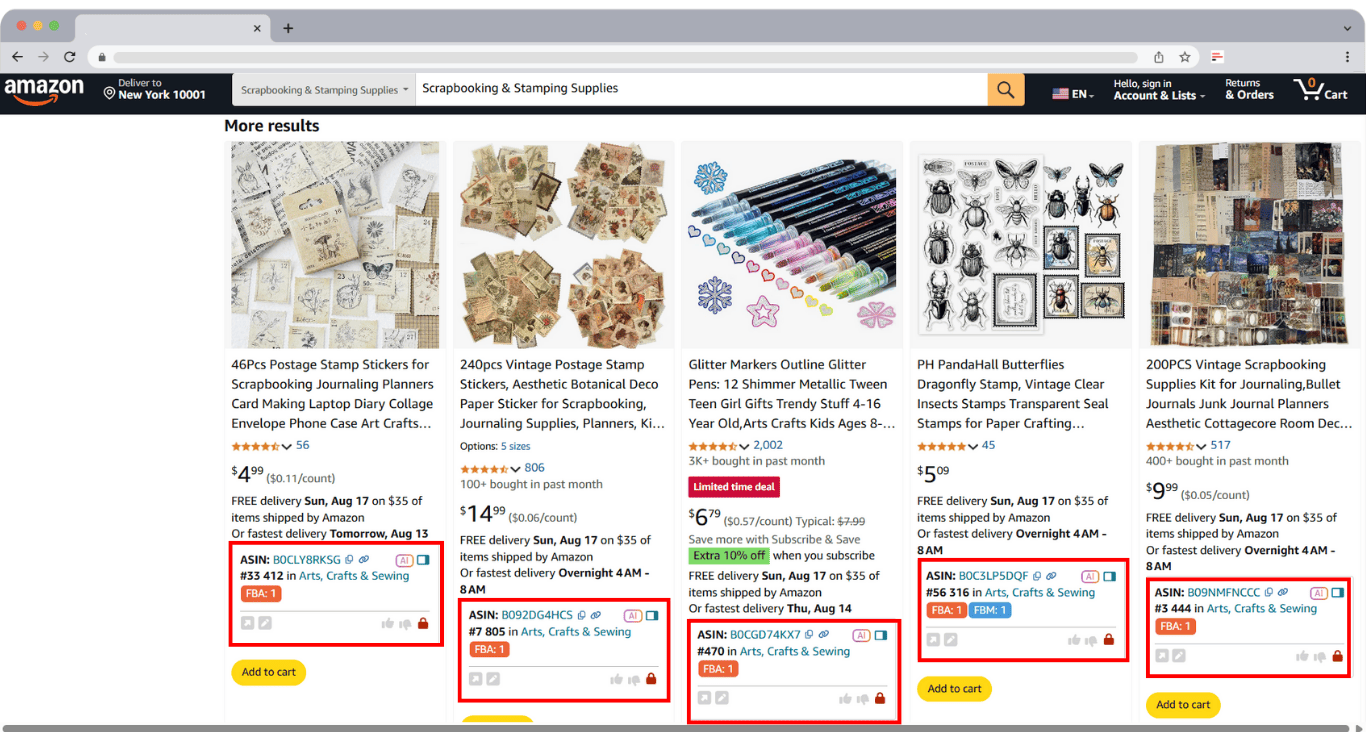
Quick View tiles appear on Amazon search results to triage winners/losers at a glance before you click through.
- Competitor storefront insights
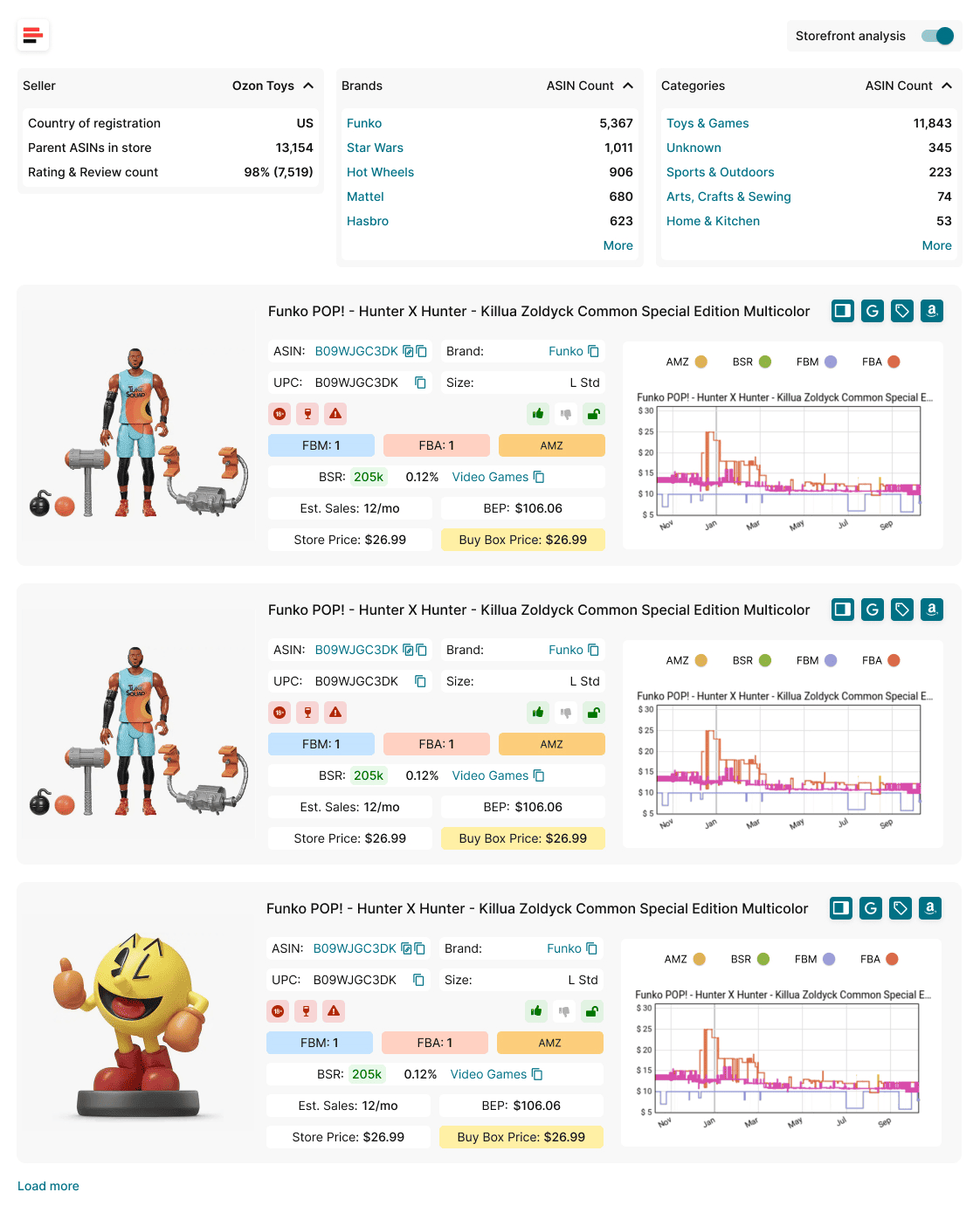
Storefront Widget summarizes a seller’s brands, categories, and best movers, then lets you dig into profitable look-alike offers.
- Risk and compliance guardrails
Built-in IP Alert (with violation type/date), Restriction Checker, and visual Alerts and Flags for hazmat, meltable, fragile, oversize, generic, and “Amazon competes” scenarios.
- Profit and pricing math
FBM&FBA Profit Calculator with editable fees, shipping, prep, taxes; VAT Calculator for EU/UK/CA/US setups; Buy Box history and pricing context.
- Demand & competition tools
Sales Estimator, Stock Checker (FBA/FBM quantities), Variation Viewer (popularity/rating share), and Offers (sellers, prices, stock, Buy Box%).
- Data capture & sourcing
One-click Google Sheets Export, Notes (with likes/dislikes), Sourcing AI to surface up to 10 vetted US suppliers/distributors, and Lookup Links to Google/eBay/Walmart/Target.
- History & charts
Interactive Keepa-driven charts for price/rank trends directly in the panel.
How it works (step by step)
How to install Seller Assistant Extension
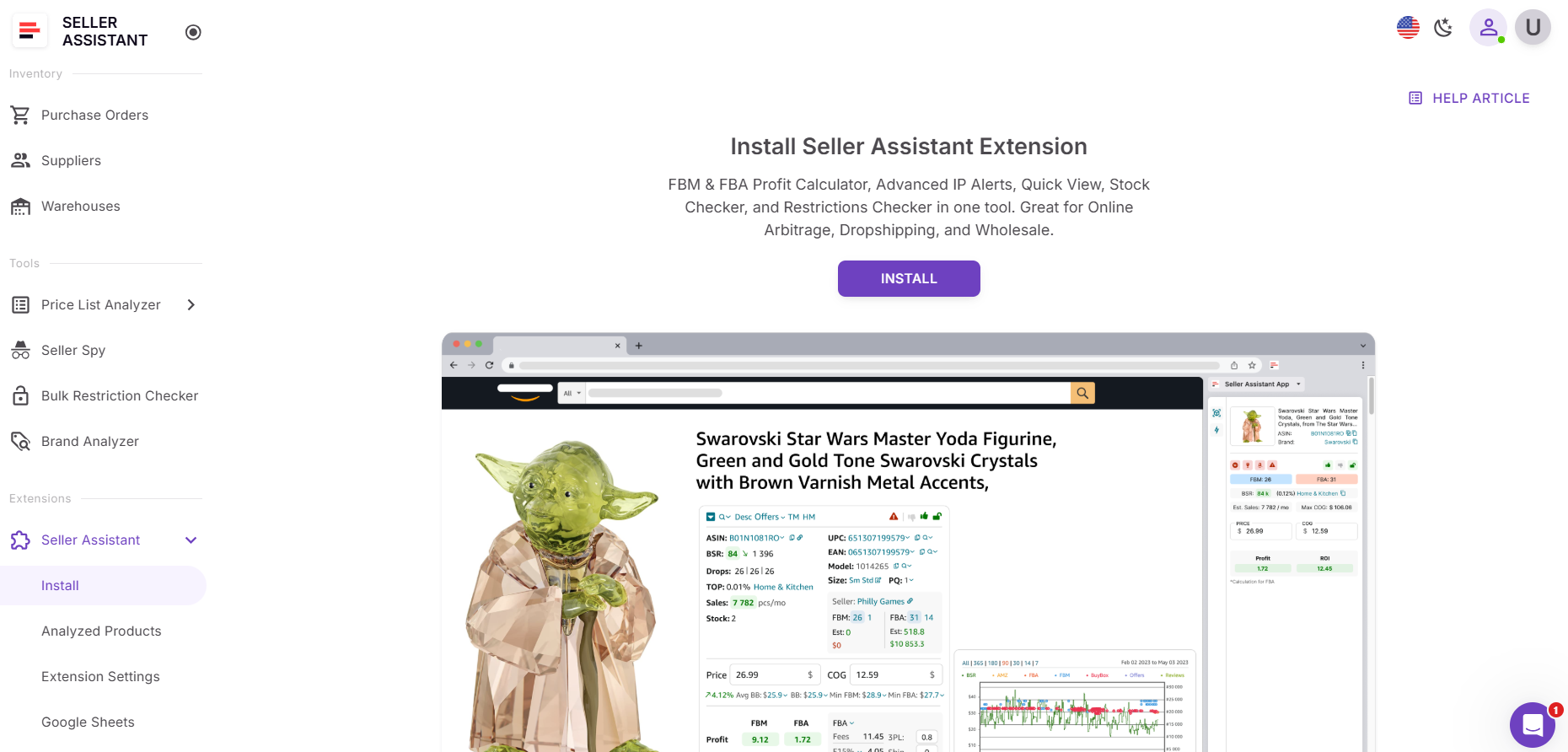
- Step 1. Install the Extension
Create a Seller Assistant account, then install the extension for Chrome, Edge, or Firefox from the store.
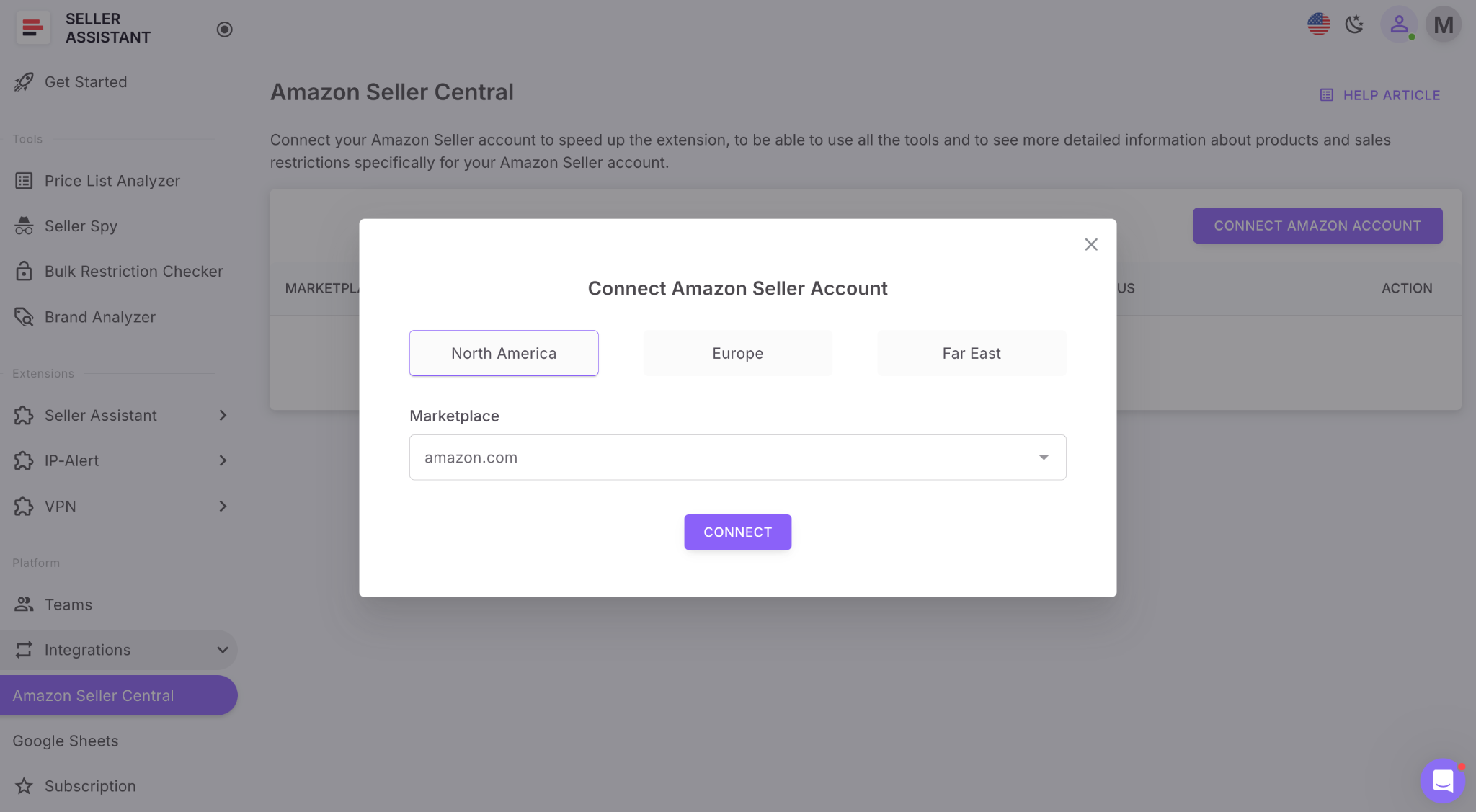
- Step 2. Connect your Amazon account
Link Seller Central inside your Seller Assistant account. This unlocks account-specific data (eligibility, fees, restrictions) for accurate decisions.
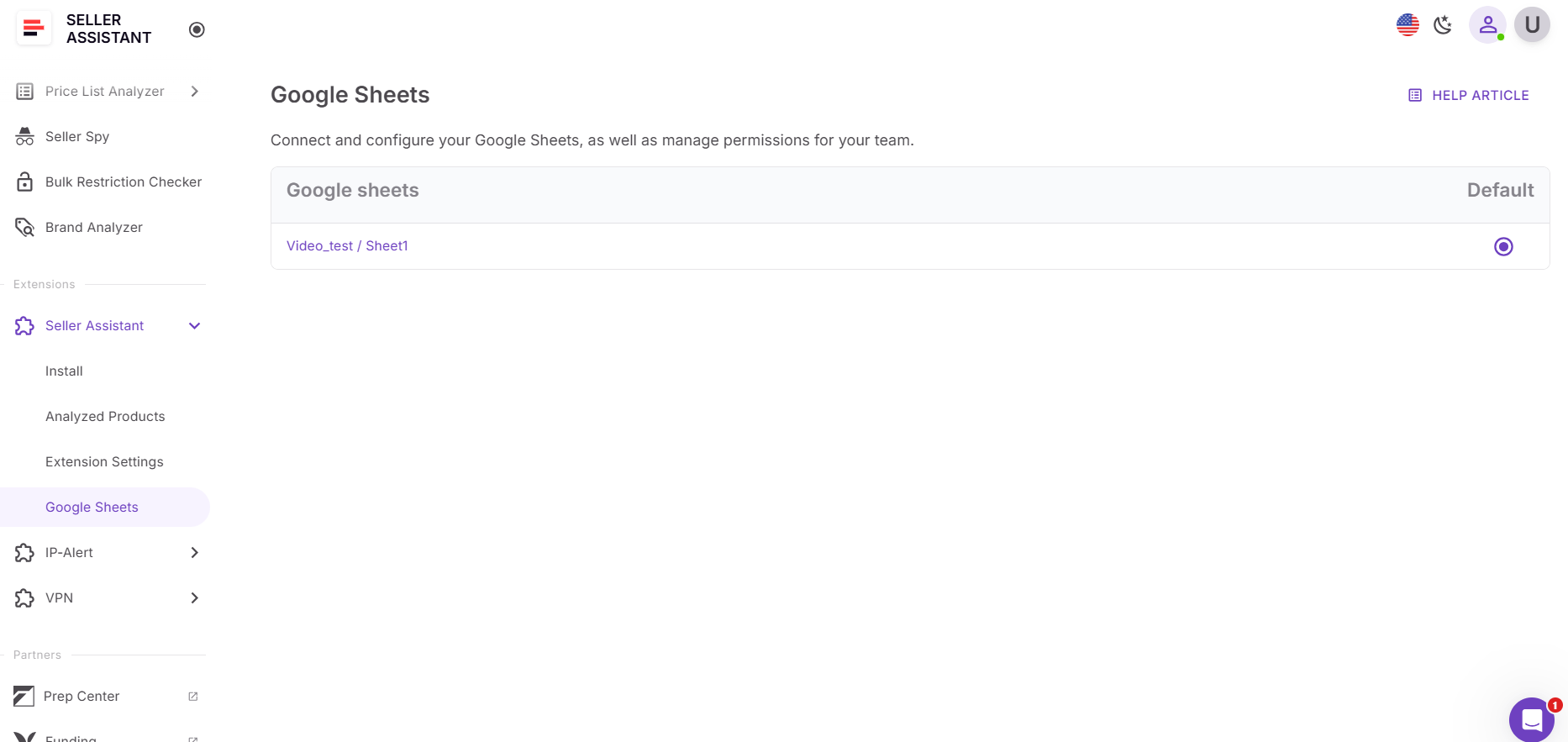
- Step 3. Connect Google Sheets
Pair your sheet in Settings so you can export researched products with one click.
- Step 4. Configure calculator defaults
In Extension settings, pick your marketplace and set COG, 3PL/shipping, prep, taxes/VAT so profit/ROI auto-calculate without retyping.
-
Step 5. Use the views where they matter
-
Product page view (auto): Open any Amazon product page ; the extension loads automatically with full metrics, risks, offers, variations, stock, and profit math.
- Quick View (auto on search): Search on Amazon; compact cards appear under each result to pre-qualify deals instantly.
- Side Panel View (activate on supplier sites): On a supplier product page, click your browser’s Extensions icon → Seller Assistant to open the split-panel and compare supplier vs Amazon data side-by-side. Scroll to reveal all metrics.
- Storefront Widget (auto): Open an Amazon seller’s storefront; the widget appears with their top brands, categories, and products for rapid competitor mining.
- Step 6. Save and share
Add notes/likes, export to Google Sheets, or pass qualified ASINs into the rest of the Seller Assistant workflow (Price List Analyzer, Brand Analyzer, Seller Spy, and POs).
SellerAmp
What it is
SellerAmp (SAS) is a single-product research and analysis tool built for online arbitrage (OA), retail arbitrage (RA), and wholesale sellers who evaluate individual products before purchasing. It works as a browser extension and mobile app, helping Amazon resellers calculate profitability, check restrictions, and estimate sales performance directly on Amazon product pages.
Unlike all-in-one platforms like Seller Assistant, SellerAmp focuses only on individual ASIN analysis – it doesn’t include bulk price list scanners, supplier databases, or workflow automation features. However, it’s a solid, lightweight solution for sellers who rely on manual product sourcing.
What it does
- In-depth product analysis on Amazon pages
Displays product metrics such as Best Sellers Rank (BSR), Buy Box price, category, and monthly sales estimates directly on product pages.
- Profitability calculator
Offers a detailed profit, ROI, and margin calculator where you can input product cost, shipping, and prep fees to get accurate net profitability for FBA and FBM.
Shows whether your account is approved to sell a product and flags restrictions or brand gating.
- Competition insights
Displays the number of FBA and FBM competitors, Buy Box share, and whether Amazon participates on the listing.
- Price and sales history
Integrates with Keepa to show price and rank charts for historical context – helping sellers identify stable or volatile listings.
- Sales estimation
Calculates estimated monthly sales and revenue potential based on category and BSR.
- Alerts for potential risks
Flags listings with known issues such as IP complaints, meltable products, or oversized items.
- Notes and product lists
Lets you save and organize analyzed products into lists for easy tracking or collaboration with team members.
- Mobile app with barcode scanning (RA feature)
SellerAmp includes a barcode scanning mobile app, making it particularly valuable for retail arbitrage (RA) sellers who research products in physical stores. Scanning barcodes instantly pulls up all relevant Amazon data – ROI, sales rank, restrictions, and price – allowing on-the-spot purchase decisions.
How SellerAmp fits into Amazon workflows
SellerAmp is ideal for sellers who analyze products one by one, such as online arbitrage or retail arbitrage sellers scanning items manually. It’s fast, accurate, and mobile-friendly, offering the essential insights needed for profitable reselling.
However, it’s limited when it comes to scaling wholesale operations or managing large supplier catalogs. It doesn’t automate bulk list scanning, restriction checking for hundreds of ASINs, or purchase order creation – all of which are available in Seller Assistant’s integrated workflow suite.
In short, SellerAmp is an excellent tool for retail and online arbitrage sellers who need quick product-level insights and barcode scanning capabilities – but Seller Assistant provides a more advanced, end-to-end system for sellers running large-scale or team-based wholesale operations.
Brand Analysis Tools
Brand research tells you if a brand is resale-friendly, how it performs, and whether it fits your profit targets. Seller Assistant gives resellers (wholesale and arbitrage) a brand module that’s connected to the full sourcing workflow – so you can go from insight to purchase orders without leaving the platform. SmartScout also offers a strong brand view and a wide toolset, but its approach is more database + filters and tends to fit analysts and private label workflows. It surfaces brands and products by slicing large datasets, but it’s less about integrated eligibility checks and end-to-end execution.
Seller Assistant Brand Analyzer vs. SmartScout – comparison
Capability | Seller Assistant’s Brand Analyzer | SmartScout Brands |
Purpose | Measure a brand’s resale-friendliness, revenue potential, and competition; feed results into sourcing workflow | Explore Amazon’s brand database at scale using powerful filters to find attractive niches/brands |
Built for | Wholesale, OA, dropship teams that need brand→product→PO execution | Wholesale scouts and private label analysts who want to map categories/brands via filters |
Data model | Brand summary + downloadable product breakdown (ASIN-level metrics) | Brand browser with filterable columns; open brand tabs to see products and sellers |
Core brand metrics | Brand monthly revenue, average Buy Box price, average FBA fees, Amazon in-stock rate, average FBA seller count, ratings, reviews, total products | Monthly revenue estimate, Amazon in-stock rate, average FBA sellers, dominant seller %, average price/size, brand score |
Product-level detail | Excel export with ASIN, title, category, 30-day BSR, Buy Box price, in/out of stock, seller counts, Amazon in-stock %, rating, reviews, est. revenue | Per-brand product table; filters for revenue, reviews, ratings, page score; open ASIN pages quickly |
Restrictions & IP | Works with Bulk Restriction Checker and IP Alert to verify brand gate and policy risks | No native account-level restriction or IP system (requires other tools) |
Workflow tie-in | Connected to Price List Analyzer, Seller Assistant Extension, Supplier/Warehouse databases, and Purchase Orders | Standalone discovery; export/filter, then research in other tools |
Supplier sourcing | Sourcing AI to find US suppliers/distributors from brand/products | UPC scanner and discovery tools; no built-in supplier finder for brand outreach |
Shortlisting & export | Save, filter, export product lists; push to PLA or Sheets; team notes | Export/filter in app; analysis continues outside the platform |
Team & scale | VA accounts, saved views, notes shared across modules | Seats by plan; collaboration mainly via shared views/exports |
Integrations | API, Zapier, Make, Google Sheets | Works alongside Keepa; additional modules (Ad Spy, Keyword tools, Listing builder) |
Strengths | Brand viability + immediate execution (eligibility, sourcing, PO) in one system | Fast database exploration; many filters; good for niche scouting and PL validation |
Limitations | Focused on reseller workflow vs ad/SEO tooling | Filter-first; less integrated with account eligibility and end-to-end wholesale execution |
Brand Analyzer
What it is
Brand Analyzer by Seller Assistant is a purpose-built Amazon brand research module that helps resellers (wholesale, OA, dropship) quickly spot resale-friendly brands. Instead of wrestling with generic databases and complex filters, you type a brand name and get an actionable snapshot of size, demand, pricing, competition (including Amazon’s presence), and reputation – plus a downloadable ASIN-level report for deeper analysis.
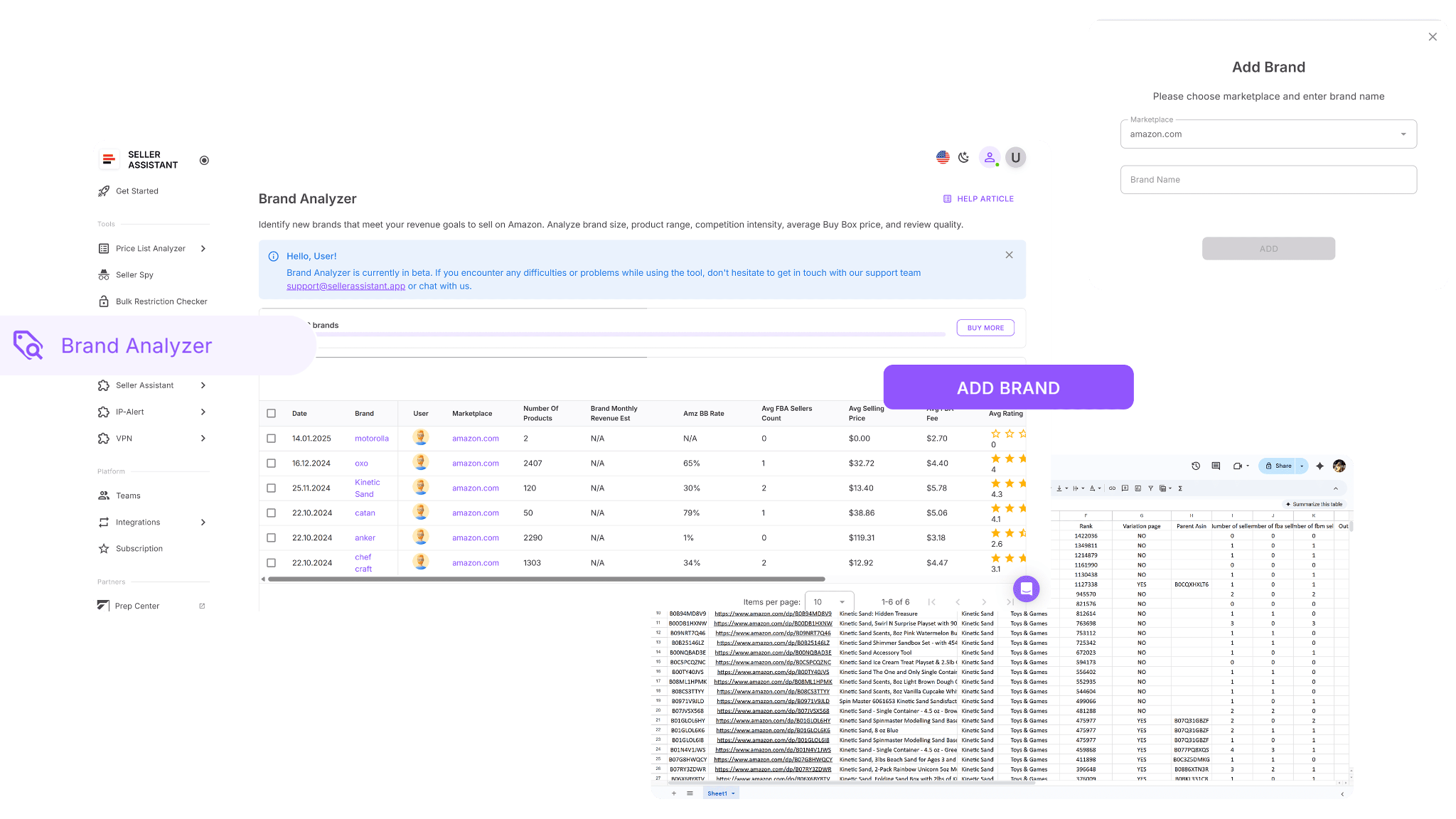
Because it lives inside Seller Assistant, Brand Analyzer ties directly into bulk restriction checks, product research, and purchasing workflows.
What it does
-
Automated brand research: Instantly evaluates whether a brand aligns with your marketplace traction and selling criteria, surfacing resale suitability without manual cross-checks.
-
Built for resellers (not PL): favors brands with broader catalogs and measurable marketplace traction.
-
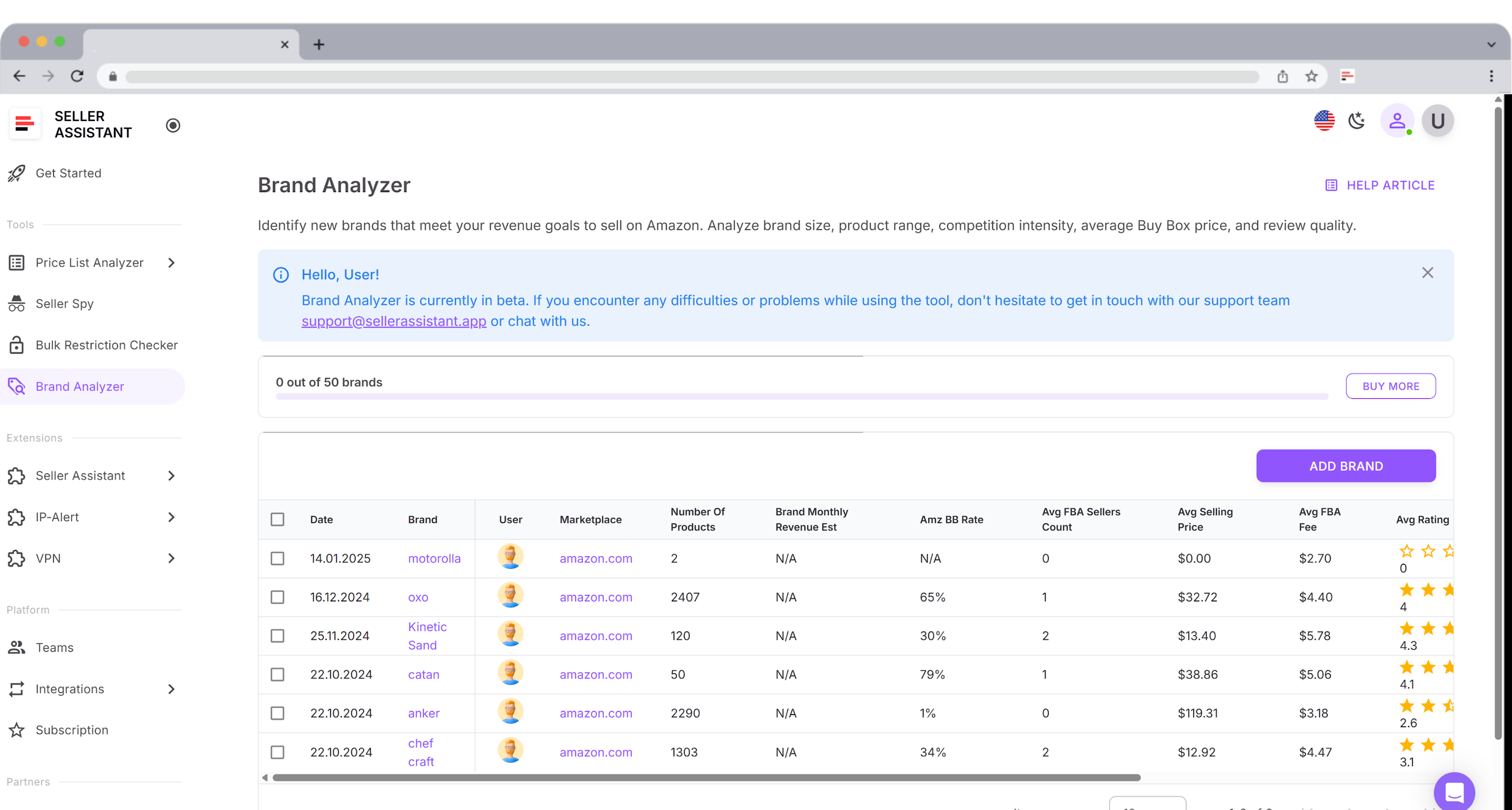
Brand summary: A compact overview with the key signals you need to say “pursue” or “pass.”
-
Brand summary metrics provided
-
Brand details: Date added, brand name, user who added it, target marketplace.
-
Catalog size: Products (high counts suggest non–private label; 500+ items is a strong reseller signal).
-
Potential revenue: Brand Monthly Revenue, Average Selling Price (Buy Box), Average FBA Fees.
-
Competition analysis: Amazon In-Stock Rate / Buy Box share (30%+ = heavy Amazon presence), Average FBA Seller Count (15+ often means thin margins).
-
Reputation: Average Rating (1–5) and Total Reviews (volume and maturity indicator).
-
Cut research time: Skip heavy manual filtering – get structured, comparable brand views instantly.
-
Bulk gate check synergy: Combine with Bulk Restriction Checker to confirm brand gates and your account eligibility at scale.
-
Working list creation: Export the ASIN breakdown for spreadsheet filtering and purchasing prep.
How it works step by step
- Step 1. Open Brand Analyzer
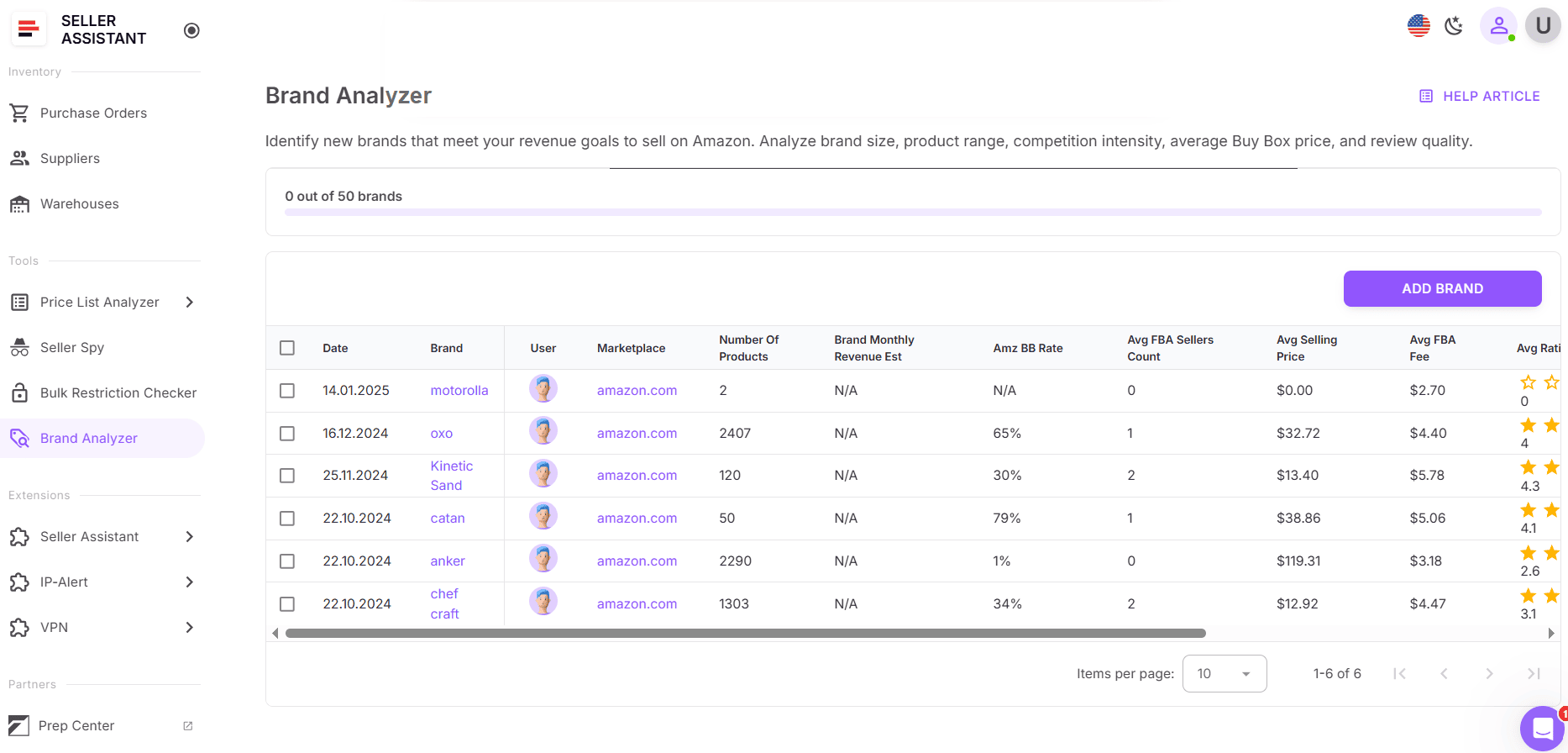
Log in to your Seller Assistant Personal Account and launch Brand Analyzer.
- Step 2. Select marketplace & enter brand
Choose the Amazon marketplace you sell in and type the brand name you want to research.
- Step 3. Review the summary
Brand Analyzer compiles the brand overview: catalog size, revenue estimate, Amazon in-stock share, average FBA sellers, ASP, FBA fees, ratings, and reviews.
- Step 4. Download the ASIN report
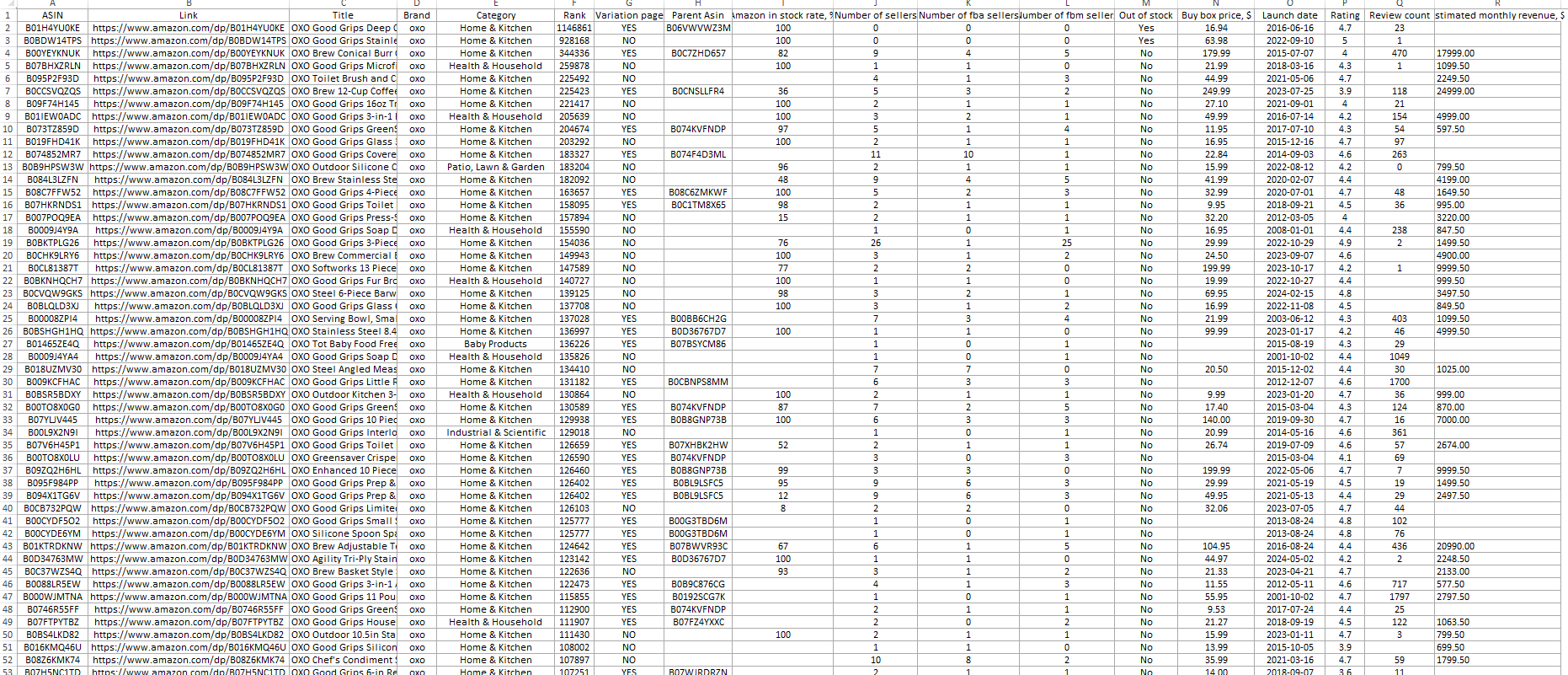
Export the .xlsx with the full product breakdown (ASIN, 30-day BSR, seller counts, Buy Box, stock, launch date, ratings/reviews, estimated revenue) for deeper sorting and filtering.
- Step 5. Filter and prioritize
In Excel, filter by the metrics that matter to you (e.g., BSR, Amazon in-stock %, seller counts, Buy Box) to shortlist products and plan outreach or purchasing.
SmartScout’s Brands
What it is
SmartScout’s Brands is a brand discovery and analysis tool designed to help Amazon sellers identify potential wholesale or private-label opportunities by exploring the performance of brands across Amazon categories. It focuses on database-driven research – not deep analytics or workflow automation. Instead of running real-time brand scans or connecting to your account, it lets users filter through SmartScout’s internal Amazon dataset to find brands that match specific sales, competition, and pricing criteria.
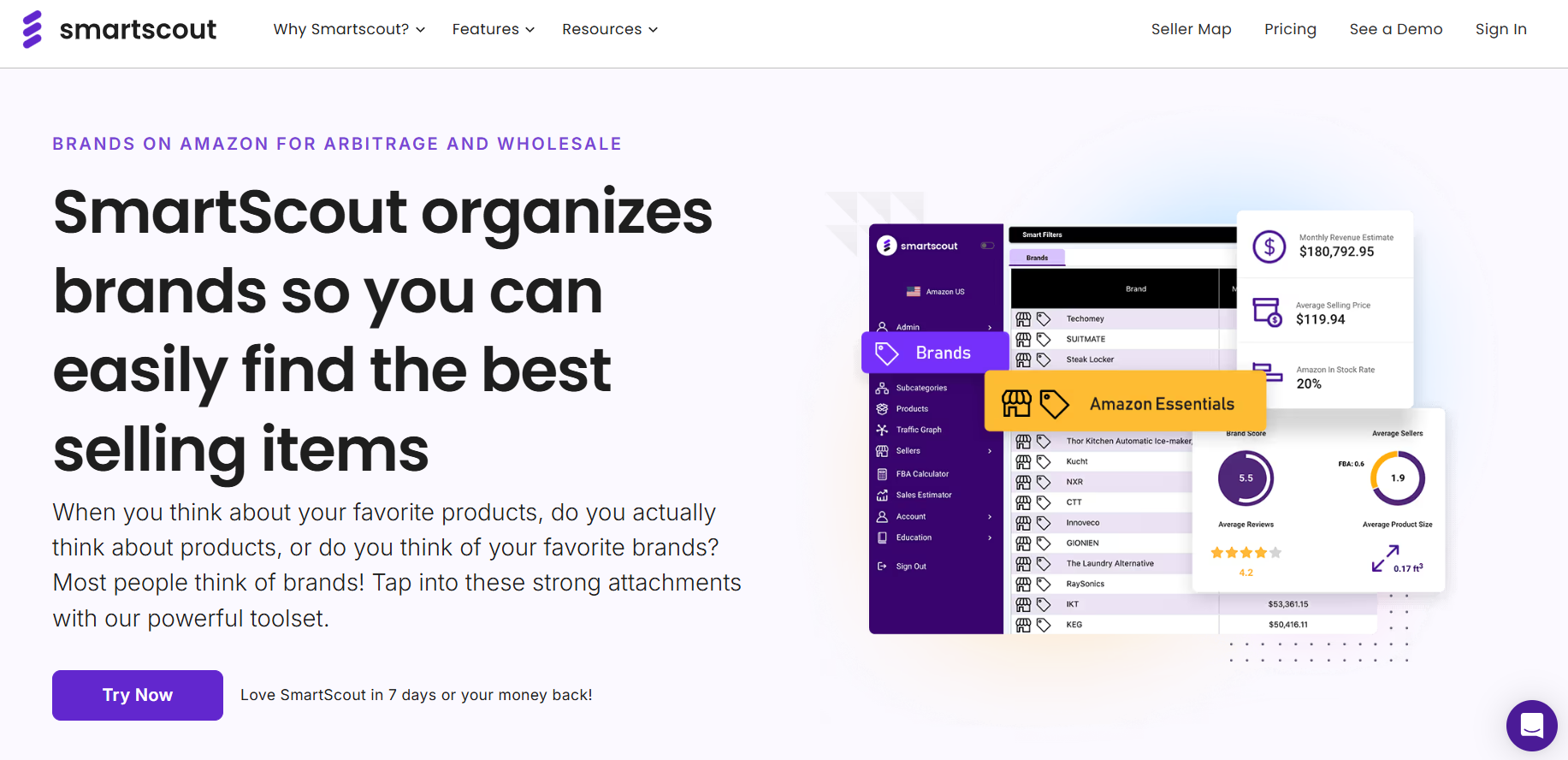
While it offers valuable insights for sellers targeting niche markets or category-level brand discovery, SmartScout’s Brands is better suited for private label and brand acquisition strategies than for daily wholesale sourcing workflows.
What it does
- Brand and category search
Search brands by name or within specific categories or subcategories to identify top-selling or underperforming brands. Navigate between categories → brands → sellers → products in one interface.
- Brand performance filters
SmartScout’s filtering system allows sellers to narrow down brands by measurable metrics:
-
Monthly Revenue Estimate – filter by minimum and maximum monthly brand revenue.
-
Amazon In-Stock Rate – limit results to brands where Amazon doesn’t dominate (e.g., below 20%).
-
Average FBA Seller Count – find brands with fewer FBA competitors.
-
Dominant Sellers – remove or target brands with sellers who hold more than 50% of sales.
-
Average Product Size – exclude bulky or oversize product lines.
-
Average Selling Price (Buy Box) – focus on brands with your desired pricing range.
-
Brand Score – evaluate listing quality based on images, bullet points, and product detail completeness.
-
Product and seller visibility
-
Open any brand tab to view all its products in one interface.
-
Switch between brand tabs to compare multiple brands side by side.
-
See average monthly revenue, number of sellers, and Buy Box distribution for each brand’s products.
-
Hover to enlarge images, filter by in-stock items, and sort products by reviews or revenue.
-
Subcategory navigation
-
Drill down into subcategories to find profitable product clusters, smaller brands, or untapped opportunities.
-
View brand and seller data across multiple subcategories simultaneously.
-
Seller insights
Each brand tab includes a sellers table, allowing you to explore who’s actively selling the brand’s products and assess potential competition or partnership opportunities.
- Supporting tools
SmartScout integrates the Brands feature with other research utilities, including:
- Traffic Graph – maps “Frequently Bought Together” connections to identify cross-sell opportunities.
- Keyword Detective & Search Terms Relevancy – helps discover keyword opportunities for SEO and PPC campaigns.
- Ad Spy – analyzes competitors’ sponsored ad keywords.
- FBA Calculator – estimates profitability metrics per ASIN.
- AI Listing Architect – generates optimized listing content for private label sellers.
How Smart Scout fits into Amazon workflows
SmartScout’s Brands is a data-filtering tool for exploring Amazon’s ecosystem of brands and identifying those worth researching further. It’s particularly effective for private label and brand aggregation sellers who rely on category-level metrics, not day-to-day sourcing analytics.
However, for wholesale or arbitrage sellers, SmartScout lacks real-time product validation, profit calculation, or restriction-checking features. Unlike Seller Assistant’s Brand Analyzer, which automates brand evaluation and integrates directly into a reseller’s workflow, SmartScout’s Brands serves primarily as a data exploration and filtering platform rather than a full analytical or decision-making engine.
FAQ
What are Amazon product analytics tools?
Amazon product analytics tools are software solutions that help sellers analyze price lists, research ASINs, and evaluate brands to find profitable products to resell. They provide key data such as sales rank, profit margins, competition levels, and restrictions to support smarter sourcing decisions.
Why do Amazon resellers need product analytics tools?
These tools automate the time-consuming parts of sourcing – matching supplier products, checking profitability, and identifying restricted or high-risk items. This helps resellers focus on scaling their business instead of manually analyzing thousands of listings.
Which types of analytics tools are most important for sellers?
The most essential tools include bulk price list scanners, single product research tools, and brand analytics tools. Together, they help sellers evaluate products at every stage – from supplier lists to brand-level strategy.
What makes Seller Assistant different from other tools?
Unlike competitors that specialize in one area, Seller Assistant unifies all analytics and automation features into a single platform. It includes bulk scanning, product research, brand analysis, IP alerts, and restriction checks – streamlining the entire wholesale and arbitrage workflow.
Can Seller Assistant replace tools like Scan Unlimited, SellerAmp, or SmartScout?
Yes. Seller Assistant offers all the key functionalities of those tools – price list analysis, ASIN-level research, and brand insights – while automating the workflow across them. This saves sellers time, money, and effort by eliminating the need for multiple separate subscriptions.
Final Thoughts
Choosing the right Amazon product analytics tools can make or break your product or brand discovery. While tools like Scan Unlimited, SellerAmp, and SmartScout each serve a specific purpose – from bulk list scanning to product or brand discovery – they often work in isolation, forcing sellers to juggle multiple subscriptions and workflows.
Seller Assistant changes that. It combines all the essential functionalities – bulk price list analysis, single ASIN research, brand analytics, restriction checking, IP alerts, profit and ROI calculators, and even workflow automation – in one integrated platform built specifically for wholesale, online arbitrage, and dropshipping sellers.
Seller Assistant automates and connects every stage of your Amazon wholesale and arbitrage workflow. It brings together in one platform: workflow management tools – Purchase Orders Module, Supplier Database, Warehouse Database, bulk research & sourcing tools – Price List Analyzer, Bulk Restriction Checker, Sourcing AI, Brand Analyzer, Seller Spy, Chrome extensions – Seller Assistant Browser Extension, IP-Alert Extension, and built-in VPN by Seller Assistant, and integrations & team access features – seamless API connectivity, integrations with Zapier, Airtable, and Make, and Virtual Assistant Accounts.

