



If you’ve ever stared at a supplier spreadsheet full of barcodes and wondered which of those items actually sell on Amazon, you already know why learning how to convert UPC to ASIN matters.
Every Amazon listing is built around an ASIN, while suppliers use UPCs – and connecting those two worlds determines whether your sourcing pays off. With Seller Assistant’s UPC to ASIN converters and powerful Price List Analyzer, you can instantly match products, analyze profitability, and build a ready-to-buy list.
Let’s explore how smart sellers convert UPCs to ASINs fast, accurately, and at scale.
Note. Seller Assistant is an end-to-end Amazon workflow management platform that integrates 10+ wholesale-focused solutions into one connected system. It combines sourcing workflow automation, bulk research and intelligence tools, and integrated Chrome extensions – giving you everything you need to streamline finding deals, managing suppliers, and creating purchase orders.

The platform aggregates: workflow management tools – Purchase Orders Module, Suppliers Database, Warehouses Database to organize, automate, and scale every step of your wholesale and arbitrage operations; bulk research & sourcing tools – Price List Analyzer, Bulk Restriction Checker, Sourcing AI, Brand Analyzer, Seller Spy to evaluate supplier price lists, verify selling eligibility and restrictions, open new brands, and discover winning product ideas from competitors to expand your product catalog; Chrome extensions – Seller Assistant Browser Extension, IP-Alert Extension, and built-in VPN by Seller Assistant to deep-research products, check IP claims and compliance, and access geoblocked supplier sites directly within your browser; and integrations & team access features – seamless API connectivity and integrations with Zapier, Airtable, and Make, plus Virtual Assistant Accounts for secure, scalable team collaboration.
With Seller Assistant, every step of your Amazon wholesale and arbitrage workflow is automated and connected.
What Are UPCs, EANs, and ASINs – and How They Work Together
Every product sold on Amazon is identified by a unique set of product codes – UPC, EAN, and ASIN – that connect supplier inventory with Amazon’s catalog.
A UPC (Universal Product Code) is a 12-digit barcode used mainly in the United States and Canada. It’s the manufacturer’s identifier that most suppliers include in their product lists.
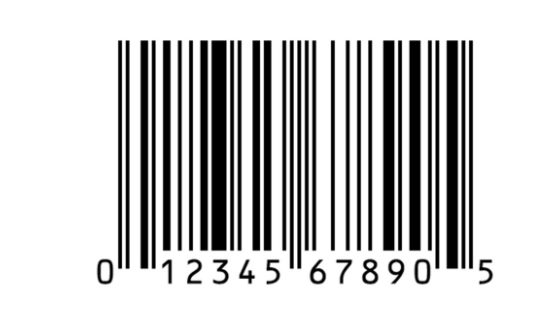
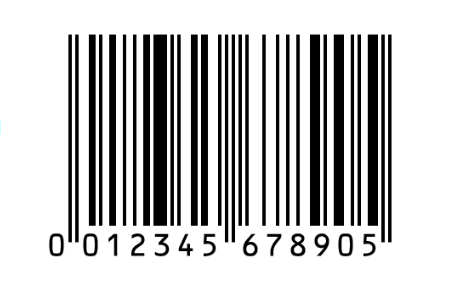
An EAN (European Article Number) serves the same purpose internationally. It’s typically a 13-digit version of the UPC used by European and global distributors.
An ASIN (Amazon Standard Identification Number) is Amazon’s internal catalog ID – a ten-character alphanumeric code assigned to every product listed on the marketplace.
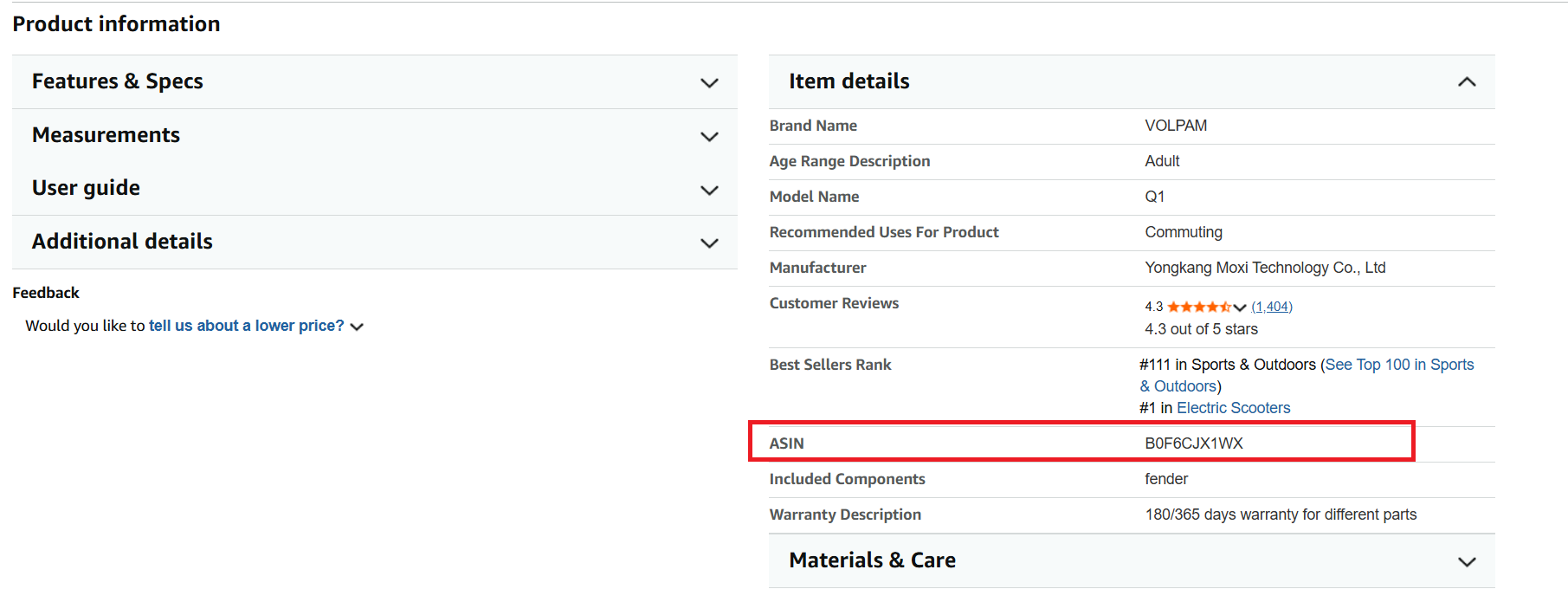
When you sell on Amazon, matching UPC or EAN to ASIN bridges the gap between your supplier’s data and Amazon’s listings. It ensures you’re analyzing the correct products, avoiding duplicates, and staying compliant with Amazon’s product catalog rules.
Example
UPC: 012345678905 → EAN: 0012345678905 → ASIN: B000VU9BCC
Understanding how UPCs, EANs, and ASINs work together is the foundation of accurate sourcing, efficient listing, and data-driven product analysis for every Amazon seller.
UPC vs EAN vs ASIN – Comparison Table
Attribute | UPC (Universal Product Code) | EAN (European Article Number) | ASIN (Amazon Standard Identification Number) |
Format | 12-digit numeric code | 13-digit numeric code (or 8-digit short form) | 10-character alphanumeric code |
Used in | United States and Canada | Europe and worldwide | Amazon marketplace only |
Assigned by | GS1 (U.S.) | GS1 (international branches) | Amazon |
Purpose | Identifies products for retail and distribution | Identifies products internationally for retail and logistics | Identifies and indexes products in Amazon’s catalog |
Example | 012345678905 | 0012345678905 | B000VU9BCC |
Used by Sellers for | Sourcing and supplier file matching | International sourcing and supplier matching | Product research, pricing, and listing |
Relationship | Manufacturer barcode used to match to ASIN | International version of UPC used to match to ASIN | Amazon’s unique identifier for each listing |
Why Converting ASIN to UPC and Back Matters for Amazon Sellers
Converting ASIN to UPC or UPC to ASIN is essential when you need to connect supplier data with Amazon listings. Sellers use UPCs, EANs, and manufacturer codes during sourcing, but Amazon operates on ASINs – so translating between them ensures accurate product matching, clean listings, and profitable sourcing decisions.
Enable bulk product processing
When working with wholesaler price lists or OA spreadsheets, you often receive thousands of UPCs. Converting them to ASINs – or the other way around – lets your sourcing tools analyze them, calculate ROI, and filter profitable items automatically.
Verify correct supplier products
Suppliers share product data using UPCs or EANs, while Amazon uses ASINs. Converting between both ensures you’re looking at the right item and not a similar variation, multipack, or outdated listing.
Analyze product profitability
Sourcing decisions rely on accurate data – and you only get complete Amazon metrics when the supplier’s UPC is correctly mapped to the ASIN. This gives you fees, Buy Box pricing, BSR, and competition insights that guide profitable purchasing.
Avoid listing mismatches
When you know both the ASIN and the UPC, you reduce the risk of attaching your offer to the wrong listing. That mistake can lead to negative reviews, returns, or even listing suppression.
Spot duplicate or merged listings
Some products have multiple ASINs tied to the same UPC. Converting between both helps you identify duplicates, variations, or merged listings so you can choose the best one to sell against.
Check product authenticity
Matching an ASIN back to its original UPC helps confirm that a product is genuine and tied to the correct manufacturer. It prevents ordering inventory that doesn’t match the listing and protects your account from authenticity issues.
How to Сonvert ASIN to UPC
Seller Assistant offers a fast, accurate, and completely free Amazon ASIN to UPC Converter that lets you pull product identifiers in seconds. Instead of digging through manufacturer sheets or searching manually, you simply drop in an ASIN and instantly get its UPC, EAN, GTIN, product title, category, model number, and part number. It’s one of the easiest ways for sellers to validate listings, check product data, and connect Amazon catalog information with real-world manufacturer identifiers.
/[a]
Step 1. Open the ASIN to UPC converter
Go to Seller Assistant’s website and navigate to the free ASIN to UPC Converter Tool. The tool loads instantly and doesn’t require an account or setup.
Step 2. Enter the ASIN you want to convert
Paste any valid Amazon ASIN into the input field. You can convert single ASINs, test variations, or check competitor listings.
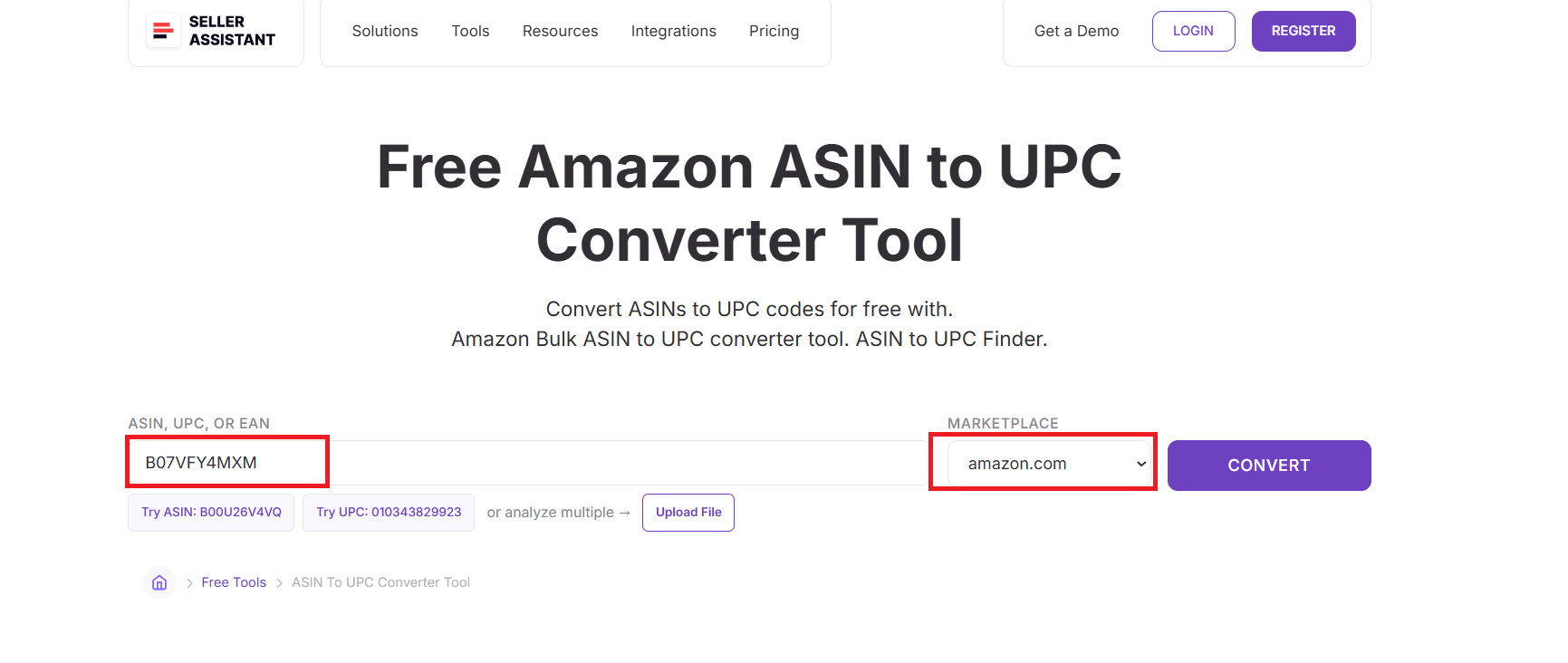
Step 3. Select your Amazon marketplace
Choose the marketplace where the product is listed, such as Amazon.com, Amazon.co.uk, or Amazon.de. This ensures the tool pulls accurate regional product identifiers.
Step 4. Click the “Convert” button
The tool processes the ASIN and retrieves official product identifiers directly from Amazon’s catalog. No manual lookup or additional research is required.
Step 5. Review the product identifiers
You’ll instantly see:
- UPC
- EAN
- GTIN
- Product title
- Category
- Model number
- Part number
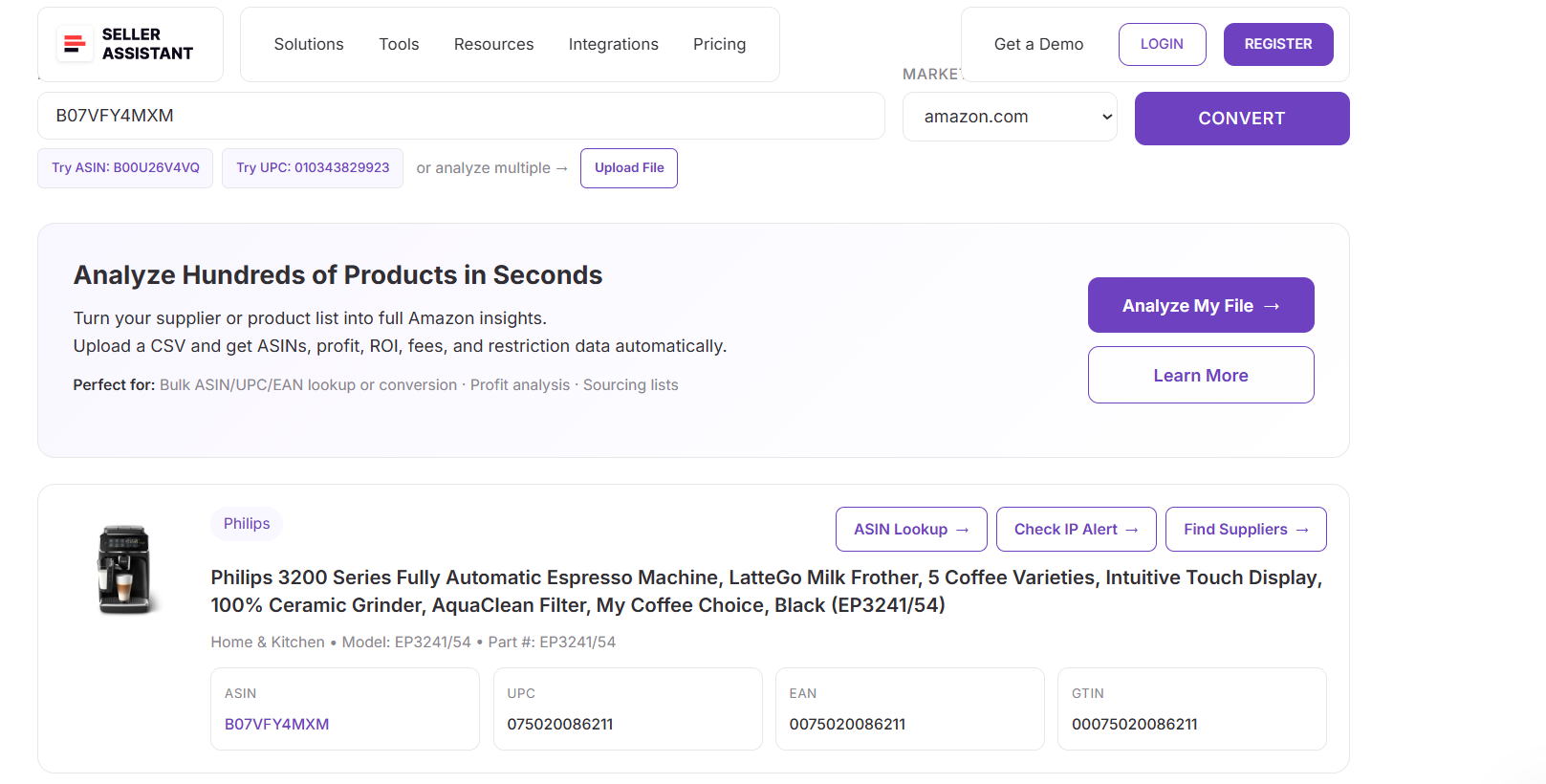
This confirms the exact product match and gives you all the manufacturer identifiers you need for sourcing, cross-checking suppliers, or preparing listings.
How to Сonvert UPC to ASIN
Seller Assistant provides a free, fast, and accurate UPC to ASIN Converter that makes product matching effortless. Instead of searching Amazon manually or opening dozens of tabs, you simply paste a UPC, pick your marketplace, and instantly get the correct ASIN, product title, category, and full Amazon catalog data. It’s one of the quickest ways to turn supplier barcodes into Amazon-ready product identifiers – perfect for wholesale, OA, and dropshipping workflows.
/[b]
Step 1. Open the UPC to ASIN converter
Visit Seller Assistant’s website and open the free UPC to ASIN Converter Tool. It’s a browser-based tool – no installation or login required.
Step 2. Enter the UPC you want to convert
Paste a 12-digit UPC into the input field. You can convert individual UPCs or quickly test multiple supplier products one by one.
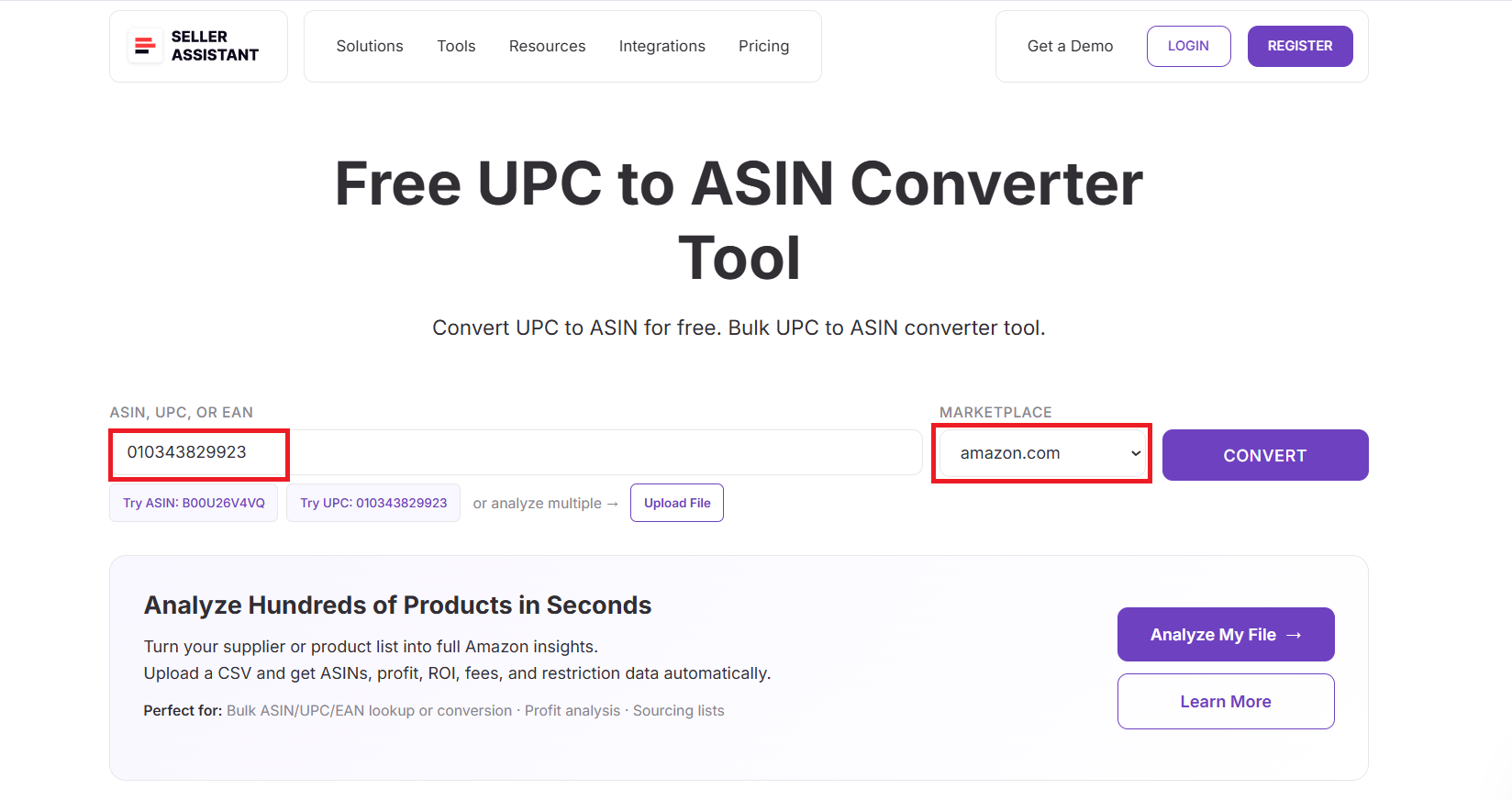
Step 3. Select your Amazon marketplace
Choose the marketplace where the product is listed (Amazon.com, Amazon.ca, Amazon.co.uk, etc.). This ensures the correct ASIN is retrieved from that region’s catalog.
Step 4. Click the “Convert” button
The tool checks the UPC against Amazon’s product database and instantly fetches the matched ASIN. No manual catalog lookups or guesswork.
Step 5. Review the matched ASIN and product data
The converter displays:
- ASIN
- UPC
- EAN
- GTIN (if available)
- Product title
- Category
- Brand
- Model
- Part number
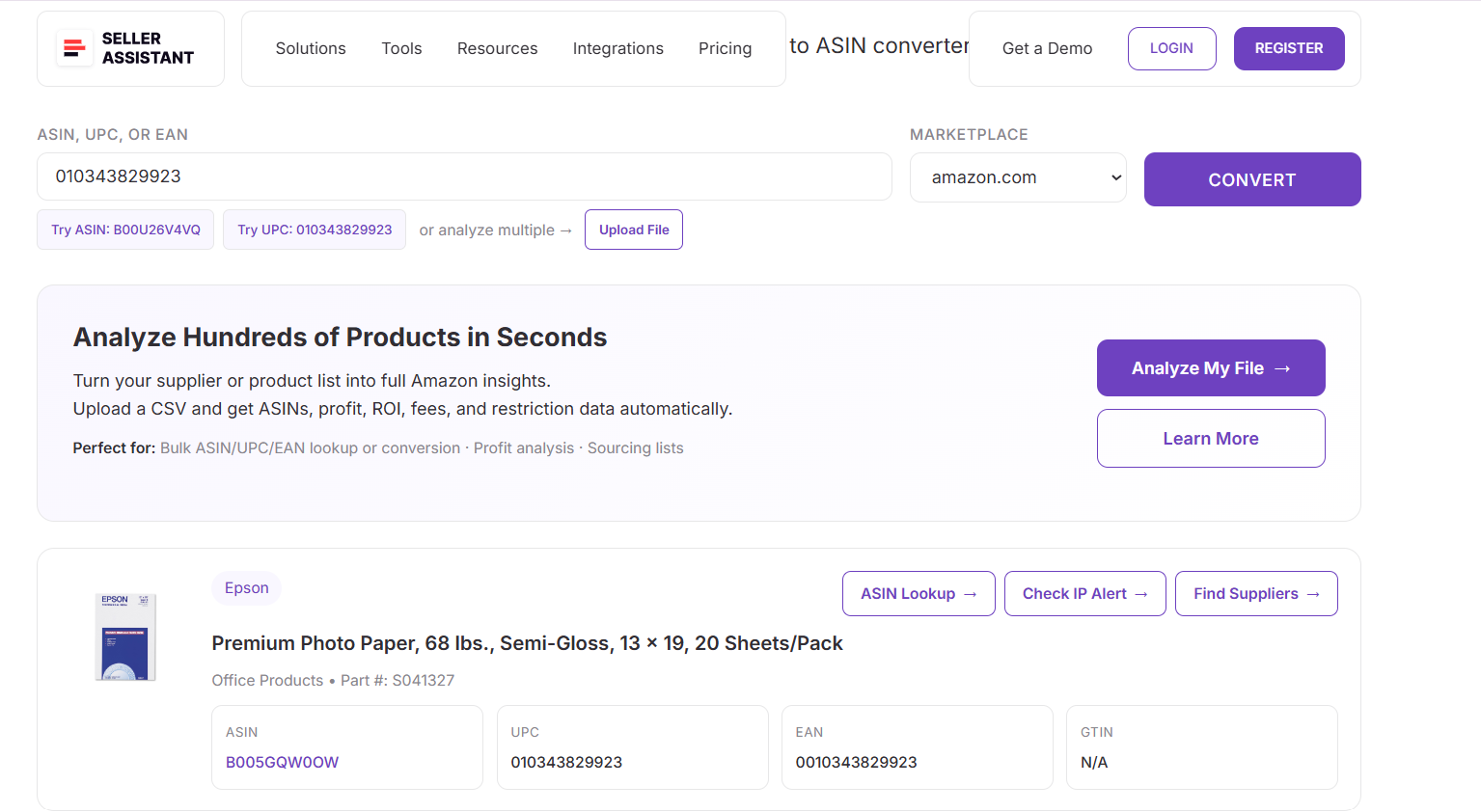
This gives you a complete match between your supplier’s UPC and the exact Amazon listing – ensuring your sourcing and listing decisions are accurate.
How to Convert EAN to ASIN
Seller Assistant also offers a free and reliable EAN to ASIN Converter, making it easy to match European or international supplier codes to the correct Amazon ASIN. Instead of searching manually or relying on incomplete third-party data, you simply paste an EAN, select your marketplace, and instantly receive the exact ASIN, product title, category, and other listing details. It’s the fastest way for international sellers and wholesale buyers to connect global product barcodes with Amazon listings.
/[c]
Step 1. Open the EAN to ASIN converter
Go to Seller Assistant’s website and access the free EAN to ASIN Converter Tool. The tool works directly in your browser – no login required.
Step 2. Enter the EAN you want to convert
Paste the 13-digit EAN (or 8-digit short version) into the input box. You can quickly test multiple international product codes.
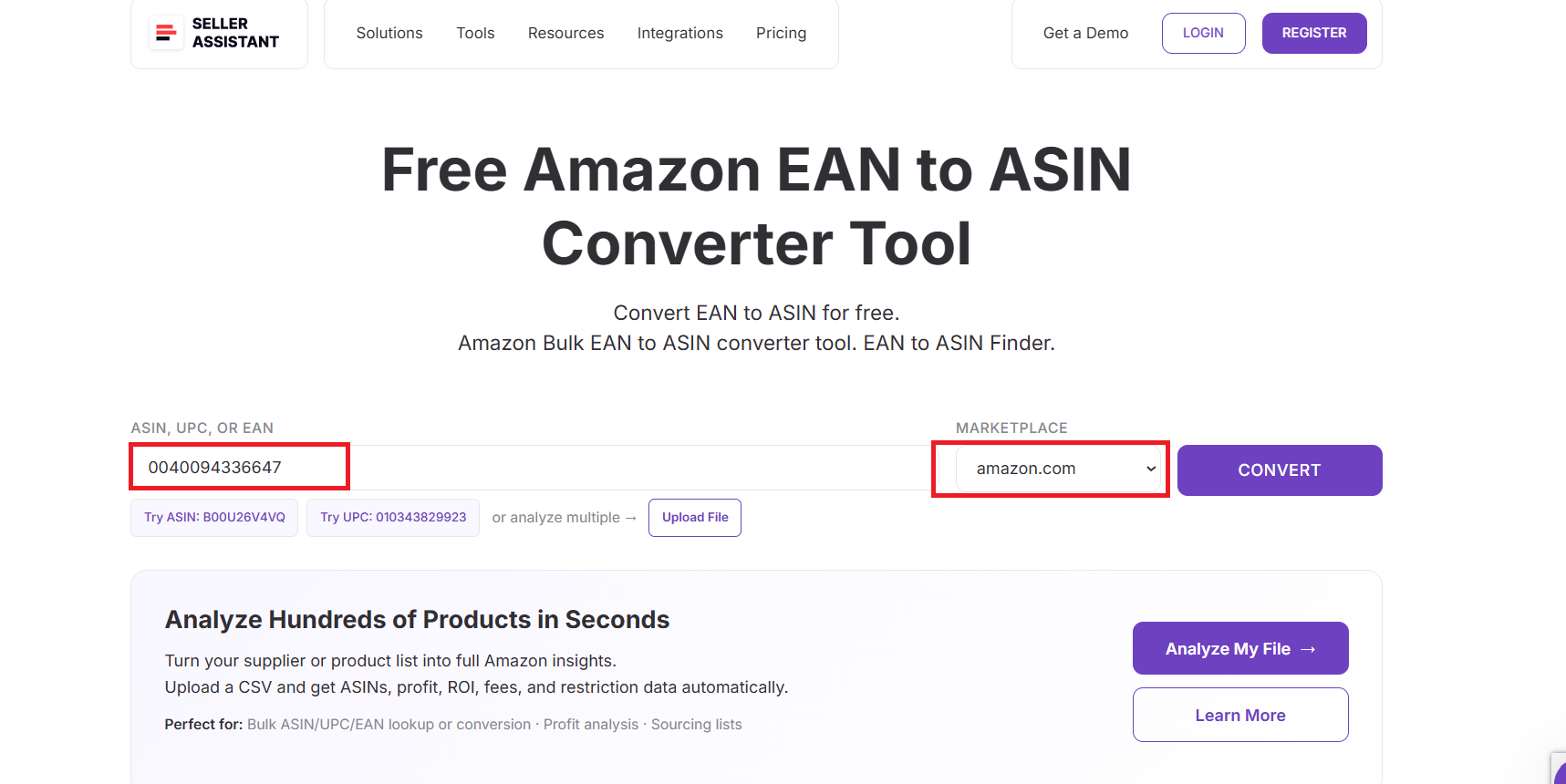
Step 3. Select your Amazon marketplace
Choose the correct marketplace, such as Amazon.co.uk, Amazon.de, Amazon.fr, or Amazon.com. This ensures accurate ASIN matching across regions.
Step 4. Click the “Convert” button
The tool searches Amazon’s catalog, finds the matching listing, and returns the correct ASIN instantly – no manual verification needed.
Step 5. Review the ASIN and product details
You’ll receive:
- ASIN
- UPC
- EAN
- GTIN (if available)
- Product title
- Category
- Brand
- Model number
- Part number
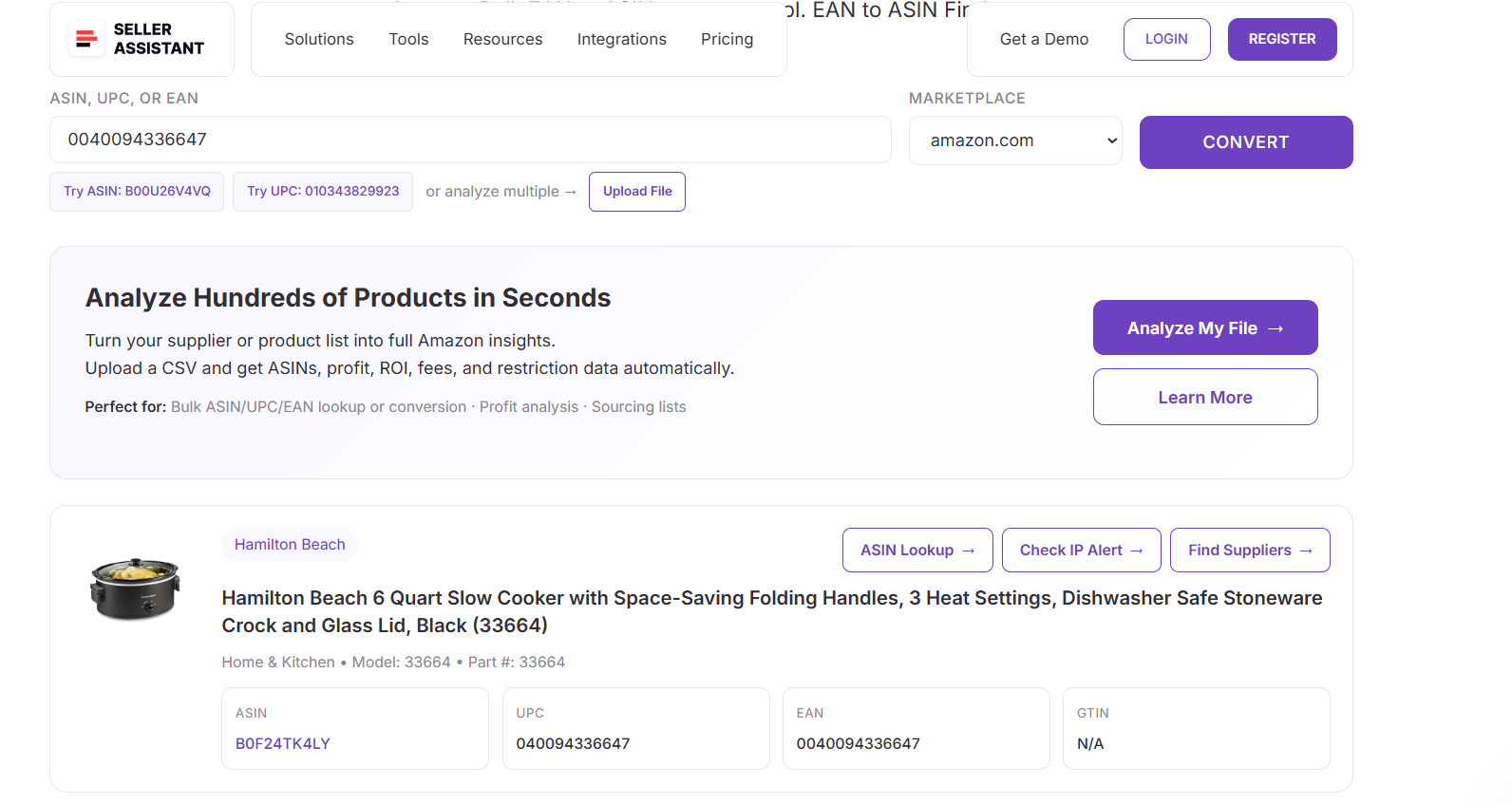
This gives you a complete Amazon match for any international EAN – ideal for wholesale sourcing, global arbitrage, and cross-market product validation.
How to Convert UPC/EAN to ASIN in Bulk
Bulk converting UPCs or EANs to ASINs is essential for wholesale, online arbitrage, and dropshipping sellers working with large supplier lists. Seller Assistant’s Price List Analyzer makes this process effortless by scanning entire spreadsheets, converting product identifiers automatically, and mapping them to the correct Amazon ASINs. Instead of converting codes one by one, the tool completes thousands at once – saving hours of manual work and eliminating product-matching errors.
What is Seller Assistant’s Price List Analyzer?
Seller Assistant’s Price List Analyzer is an advanced bulk Amazon sourcing tool that simplifies large supplier catalog processing. It automatically scans your price lists, converts UPC/EAN/SKU identifiers to Amazon ASINs, and enriches each row with all essential product metrics. Designed for wholesale, OA, and dropshipping workflows, it instantly transforms static supplier files into Amazon-ready sourcing insights.
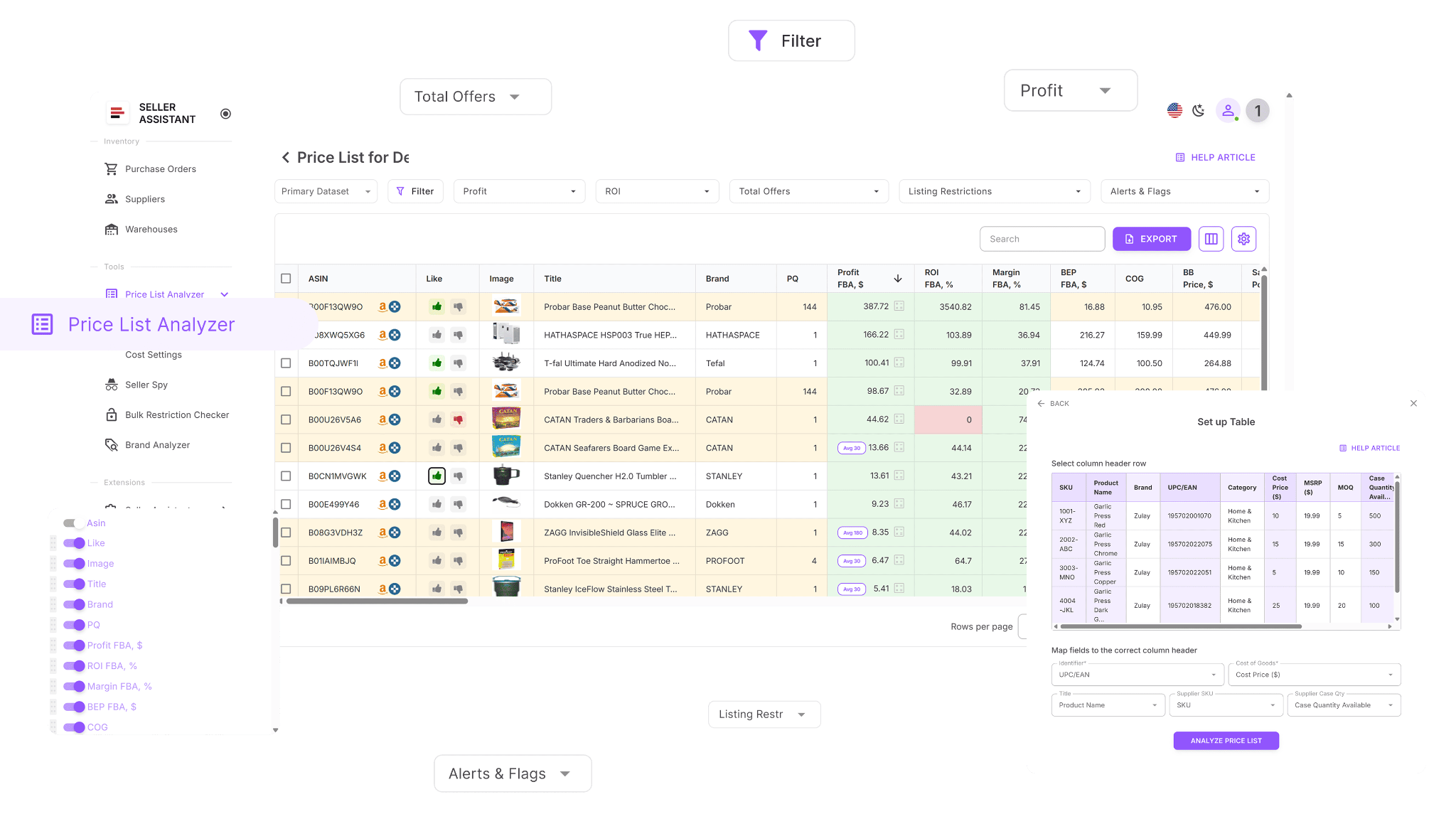
How Price List Analyzer works
Price List Analyzer enhances your spreadsheets with more than 100 essential data points after converting UPC/EAN to ASIN. This includes sales history, Buy Box performance, fees, profitability, competition, and many more metrics.
How to Analyze Suppliers’ Price Lists in Bulk | Price List Analyzer Review
You can filter, rank, and shortlist products, or adjust cost inputs and watch profit update in real time. With its speed and precision, Price List Analyzer allows Amazon sellers to make quick, data-backed sourcing decisions.
Price List Analyzer turns large supplier files into actionable ASIN-based insights. It reads your bulk UPC/EAN data, maps each product to its exact Amazon ASIN, and highlights which items are worth sourcing based on real Amazon performance and profitability.
What Price List Analyzer does for you
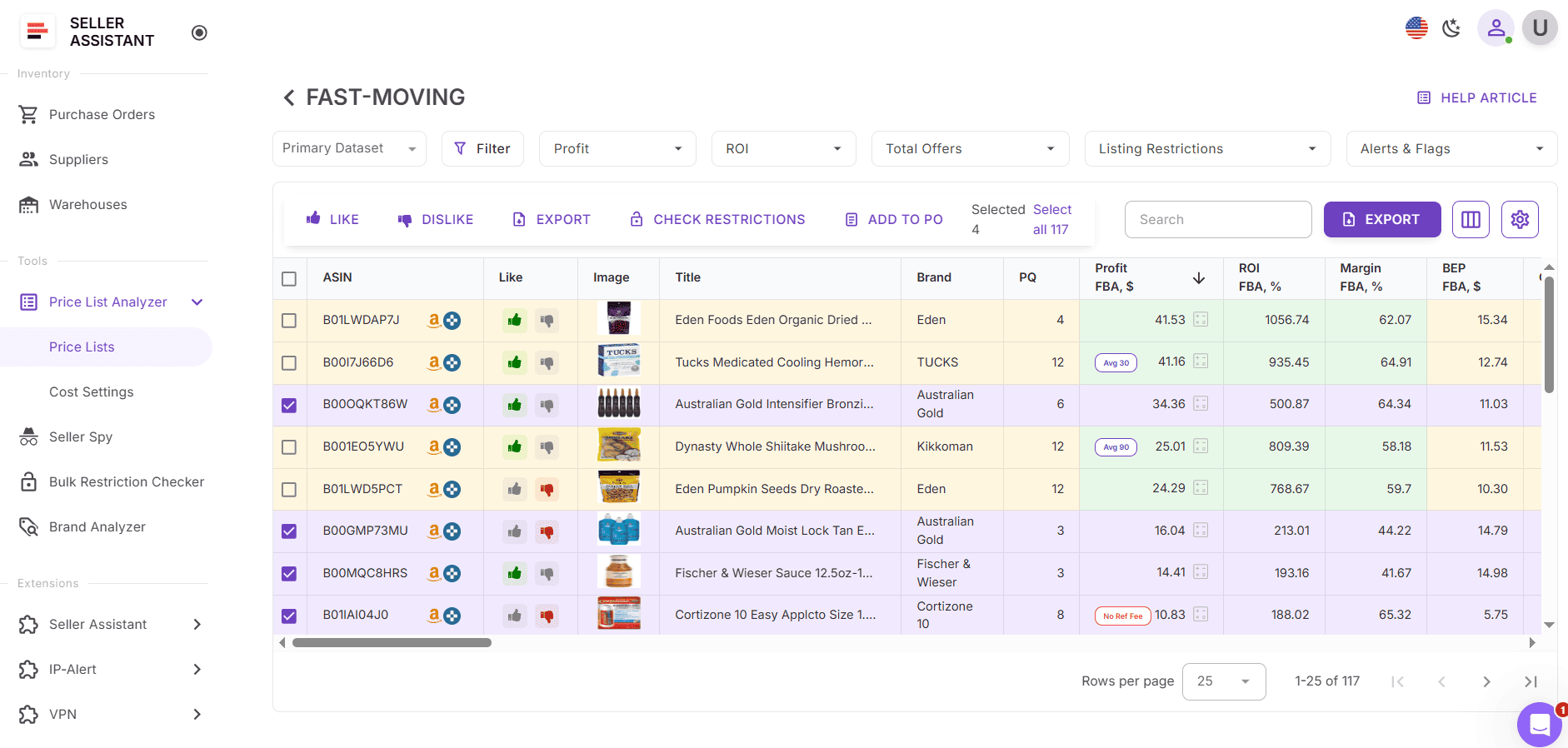
- Scans bulk supplier files and instantly converts UPCs or EANs into the correct Amazon ASINs.
- Automatically matches supplier SKUs and identifiers with Amazon catalog data.
- Verifies listing details and ensures every UPC/EAN maps to the right ASIN.
- Populates your spreadsheet with over 100 Amazon product metrics, including: sales performance – BSR, ranking trends, estimated monthly sales, velocity; profitability – profit, ROI, margins, breakeven prices; price history – 30/90/180-day Buy Box averages; Amazon fees – FBA/FBM fees, referral fees, storage, shipping, prep, hazmat; competition – seller count, Buy Box rotation, Amazon in-stock share.
- Flags problematic ASINs using alerts such as:
- ASIN Not Found, Set or Bundle, No Buy Box Price, Meltable, HazMat, Oversize, Fragile, Too Low FBA ROI, and more.
- Allows full filtering by profit, ROI, sales velocity, risk alerts, or performance.
- Lets you save custom table layouts and reuse filters for future uploads.
- Lets you like/dislike products, build shortlists, and export clean buy lists.
- Recalculates profit instantly when you edit COG, pack quantity, shipping, or prep costs.
- Provides shared team notes that reappear automatically for repeated ASINs across future uploads.
How to convert UPC/EAN to ASIN with Price List Analyzer
Step 1. Upload your supplier price list
Open Price List Analyzer in your Seller Assistant account. Upload your Excel or CSV file containing UPCs, EANs, or SKUs. Once uploaded, the tool automatically converts these identifiers into ASINs and fills your sheet with key metrics, alerts, and performance data.
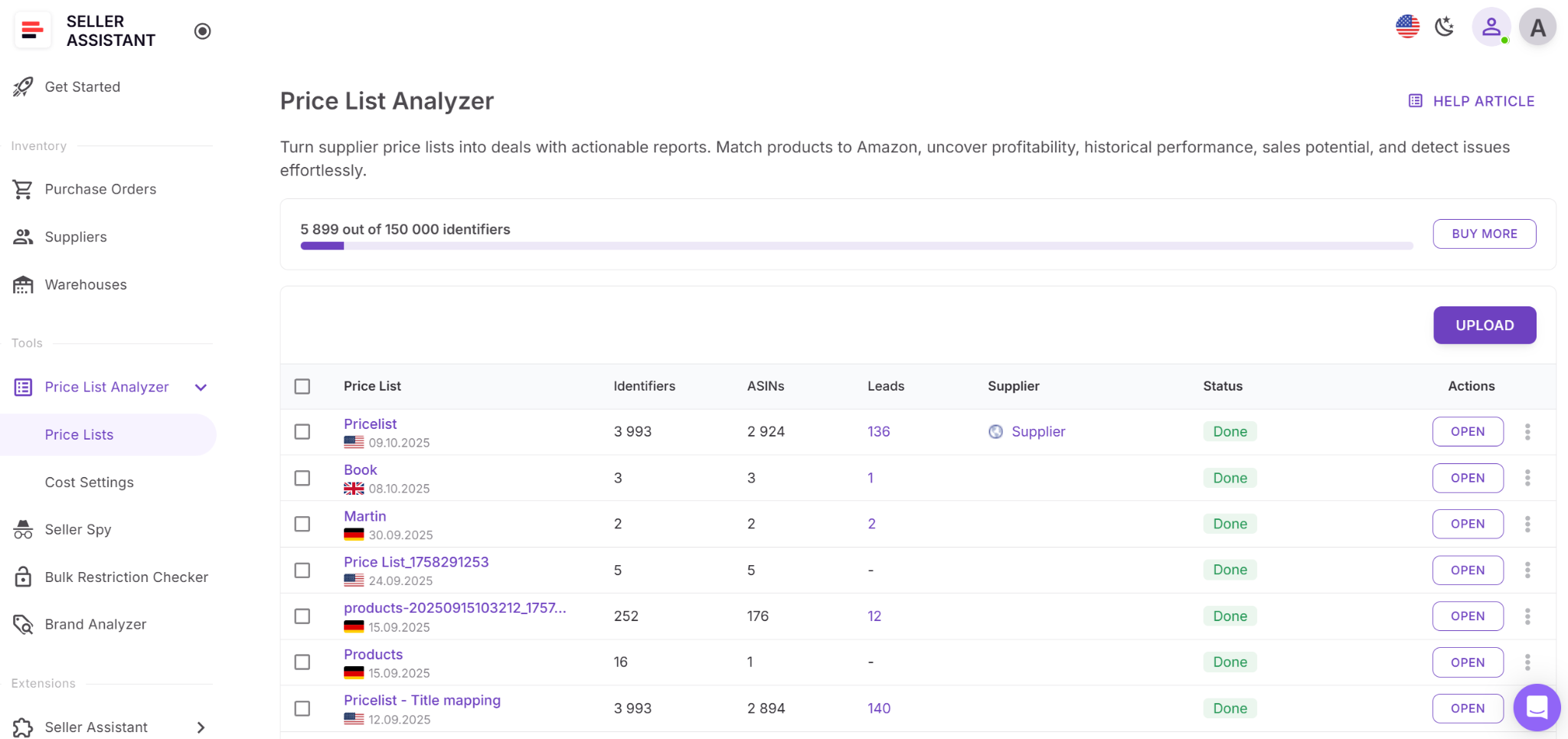
Step 2. Locate the ASIN column
After processing, open your results table and find the ASIN column. Here, each converted product displays the matched Amazon ASIN. If an identifier can’t be matched, you’ll see alerts such as ASIN Not Found.
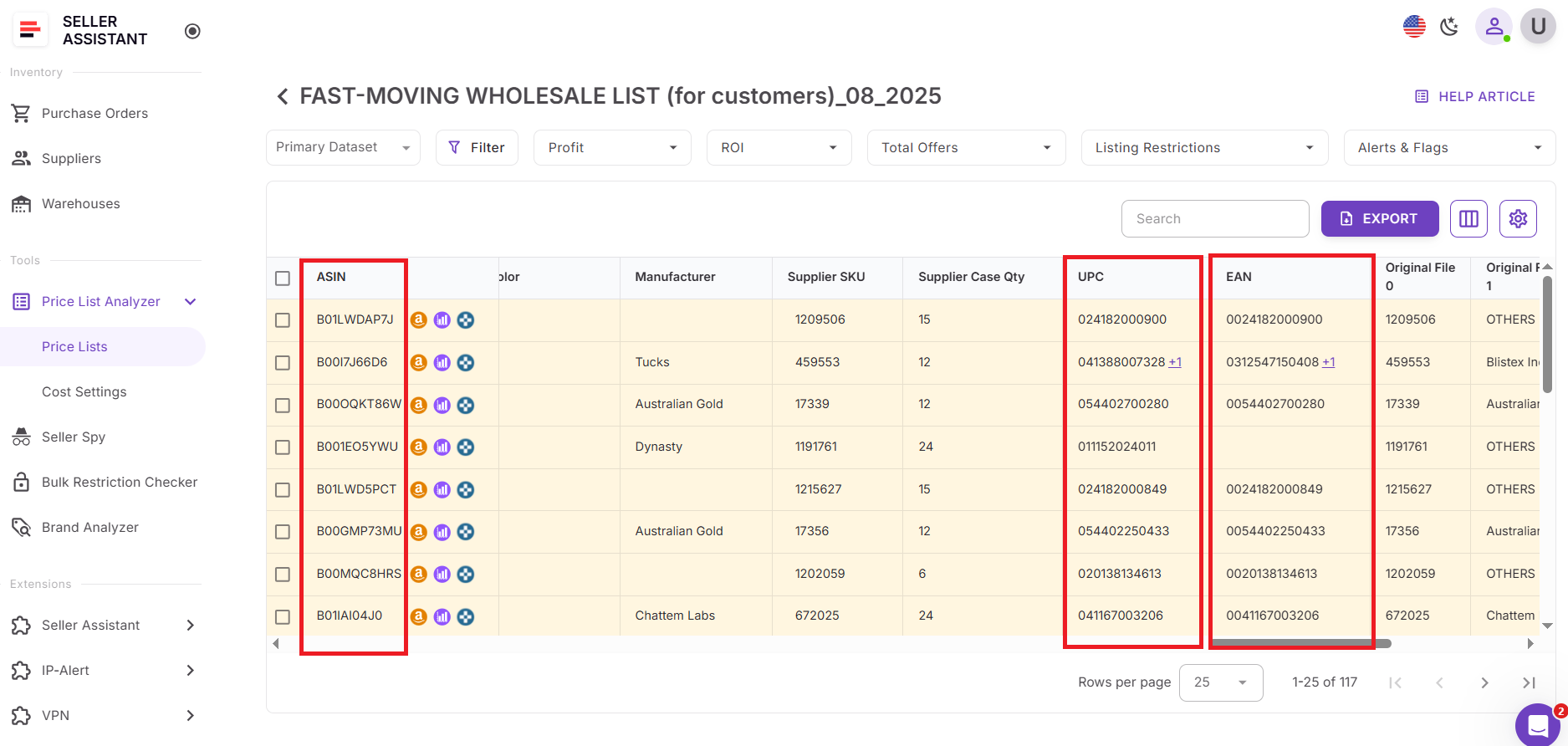
Step 3. Review converted ASINs
Check the retrieved ASINs and associated product data. Hover over alerts or open the Warnings column to understand issues such as mismatched identifiers, bundles, hazmat items, or incomplete catalog data.
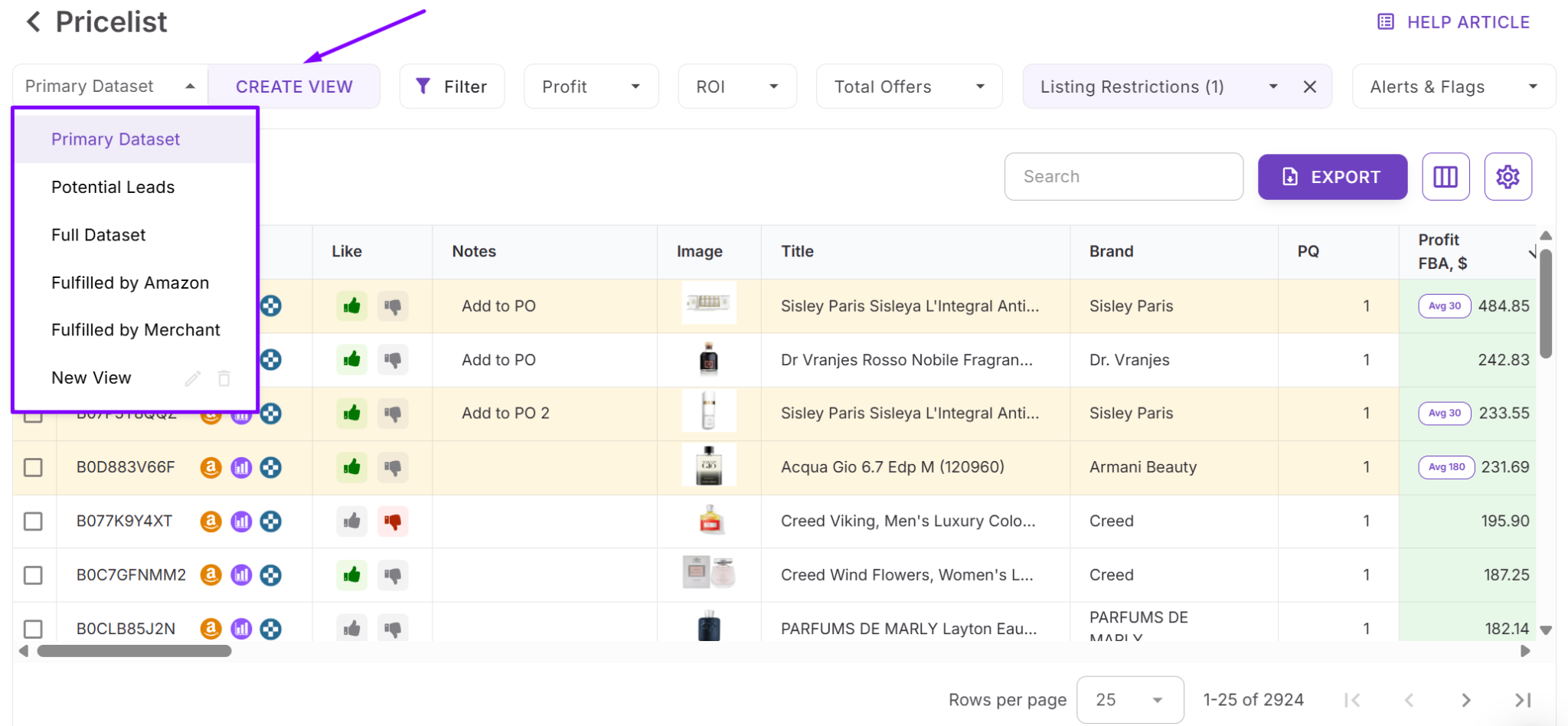
Step 4. Save custom views
Save your table view (e.g., “Matched ASINs”, “Review Needed”, “High-ROI ASINs”). These saved views help you maintain a consistent workflow for future supplier uploads.
FAQ
Can I convert UPC, EAN, or ASIN codes for free?
Yes, Seller Assistant offers free online converters for UPC → ASIN, EAN → ASIN, and ASIN → UPC. You can use them directly on the website without logging in or installing anything.
What if a UPC or EAN doesn’t match any ASIN?
If the product isn’t in Amazon’s catalog or the identifier is invalid, the tool returns “ASIN not found.” In Price List Analyzer, these items are automatically flagged so you can review or exclude them.
Can I convert UPCs or EANs to ASINs in bulk?
Yes, you can convert thousands of UPCs or EANs at once using Seller Assistant’s Price List Analyzer. It scans your supplier file, maps every identifier to an ASIN, and enriches each row with performance and profitability data.
Why do some products have multiple ASINs for the same UPC or EAN?
This happens when Amazon’s catalog contains duplicates, variations, or older merged listings. Price List Analyzer helps detect these cases by flagging mismatches and showing detailed alerts.
Is ASIN conversion accurate for every marketplace?
Yes, the tool fetches identifiers based on the marketplace you select, ensuring region-specific accuracy. Different marketplaces may have different ASINs, so choosing the correct region is essential.
Final Thoughts
Converting UPCs, EANs, and ASINs is a core part of every Amazon reseller’s workflow, whether you’re validating supplier products, checking profitability, or building out new inventory. With Seller Assistant’s free converters and the powerful bulk capabilities of Price List Analyzer, you can map product identifiers accurately, uncover profitable ASINs, and analyze supplier files in minutes instead of hours.
These tools eliminate guesswork, reduce mismatches, and give you the confidence to make data-driven sourcing decisions at scale. If you want faster, cleaner, and more profitable product research, Seller Assistant makes the entire UPC/EAN ↔ ASIN process effortless from start to finish.
Seller Assistant automates and connects every stage of your Amazon wholesale and arbitrage workflow. It brings together in one platform: workflow management tools – Purchase Orders Module, Supplier Database, Warehouse Database, bulk research & sourcing tools – Price List Analyzer, Bulk Restriction Checker, Sourcing AI, Brand Analyzer, Seller Spy, Chrome extensions – Seller Assistant Browser Extension, IP-Alert Extension, and built-in VPN by Seller Assistant, and integrations & team access features – seamless API connectivity, integrations with Zapier, Airtable, and Make, and Virtual Assistant Accounts.
[a]@[email protected] Здесь надо вставить ASIN to UPC converter
_Assigned to [email protected]_
[b]@[email protected] Здесь надо вставить UPC to ASIN converter
_Assigned to [email protected]_
[c]@[email protected] Здесь надо вставить EAN to ASIN converter
_Assigned to [email protected]_

